Nix, Reproducible Builds, and GPU Containers on Kubernetes
Nix basics, plus the layers that make GPU workloads work on Kubernetes.
Nix
Nix defines itself as the purely functional package manager. Being purely functional means that given the same inputs you always get the same output. For example, given a version of nixpkgs and a set of packages, you always will get the same env.
What Nix is for (and what it can do)
- Reproducible builds: Nix ensures that builds are consistent across different environments. By using declarative configurations, it guarantees that the exact same software is built and deployed, even on different machines or at different times. This solves issues where software might behave differently due to minor environmental differences.
- Package management: Nix can be used as a package manager, similar to
aptoryum, but with more powerful features. It allows you to install, upgrade, and manage software in a way that ensures there are no conflicts between packages or dependencies. It achieves this by using immutable environments: each package is installed into a separate directory with a unique hash, making it isolated from other packages. - Isolation: Packages installed using Nix don’t interfere with each other. If you’re working on a project that requires specific versions of libraries or tools, Nix ensures that the environment stays isolated and consistent, even if you need to switch between projects with different dependencies.
- Declarative system configuration: Nix allows you to configure entire systems in a declarative manner. You describe how the system should be set up (e.g., the packages to be installed, services to run), and Nix takes care of the rest. This is useful for automating system setups, ensuring that configurations are consistent across multiple machines.
- NixOS: NixOS is a Linux distribution built around Nix. It uses Nix to manage both the system and user environments, providing a way to have a fully reproducible and declarative operating system. This makes NixOS ideal for managing complex systems or for environments where you want complete control over configuration.
- Multi-version software support: Nix allows you to easily install and run different versions of the same software without worrying about conflicts between versions. For example, you can use different versions of Python, Node.js, or even different versions of the same library for different projects on the same system.
- DevOps and continuous deployment: Due to its reproducibility and declarative nature, Nix is very popular in DevOps practices. It helps automate the deployment of environments, making sure that the development, testing, and production systems are identical, which reduces the risk of bugs caused by environment discrepancies.
- Nixpkgs: Nixpkgs is the repository of Nix packages. It includes a huge variety of software and tools, all packaged in a way that ensures reproducibility and isolation. This repository is continuously maintained by the Nix community.
- Multi-platform support: Nix is cross-platform and can be used on Linux, macOS, and even Windows (via WSL or native ports), allowing consistent environments across different operating systems.
- Nix shells: Nix allows you to define Nix shells, which are isolated environments that provide specific versions of software for development or testing. This allows you to ensure that you’re always working with the right dependencies and tools without worrying about polluting your global environment.
How Nix works: derivations, the store, and profiles
Packages are named derivations in the Nix jargon: they are functions that take other derivations (their dependencies) as input and produce a derived result. They are built in isolation, so all dependencies must be explicitly stated. This ensures reproducibility.
Nix stores all the built derivations in the Nix store, usually located at /nix/store. The same package can be present multiple times in the Nix store at different versions, or even at the same version using different versions of its dependencies. Remember: a built derivation is the product of all its dependencies; if you change something, it is a different product.
To achieve a unique naming for each derivation, a hash is computed from the set of its dependencies. You then get a path like /nix/store/k13mm9jqxm2ndlwzsj7zicsq7lpmmjlg-elixir-1.7.3.
Unlike other package managers, Nix does not use the conventional /{,usr,usr/local}/{bin,sbin,lib,share,etc} directories. Instead, it uses a lot of symbolic links to create profiles.
A profile is a kind of derivation used to set up a user env. In a profile you get a standard Unix tree with symbolic links to executables and configuration files stored in other derivation outputs. For instance, ~/.nix-profile/bin/elixir is a symbolic link to /nix/store/k13mm9jqxm2ndlwzsj7zicsq7lpmmjlg-elixir-1.7.3/bin/elixir.
Also, ~/.nix-profile is itself a link. It points to a per-user profile, which in turn points to profile-56-link, which finally points to somewhere in the Nix store:
~/.nix-profile -> /nix/var/nix/profiles/per-user/***/profile
profile-56-link -> /nix/store/5yw8dnp9908ia6sdfvx01jzis4l2hni7-user-environment
That is, as I have said above, a profile is a derivation. It derives from a set of packages, that themselves derive from other packages. Depends on becomes in Nix derives from.
Moreover, only what you asked for is made available in the environment. For instance, Elixir depends on Erlang. Erlang is then installed somewhere in the Nix store and the Elixir installation is aware of it so it can work correctly. But unless you explicitly asked to also install Erlang, only Elixir binaries will be linked in your user environment.
Package managers usually work in an imperative way. That is, you ask them to install this, to perform an upgrade or to uninstall that. One really neat feature of Nix is Nix, the language. It is a purely functional domain-specific language that comes with Nix.
The primary use is to write derivations, yet different applications of Nix also leverage the language to manage packages and configuration declaratively.
NixOS and Nix (and my experience)
NixOS is the distro, and Nix is the cross-platform package manager.
I’ve been using NixOS for about a year. It basically solves all the problems I need solving, so for me it really is all it’s cracked up to be. Especially if you are into rolling distros, NixOS Unstable has felt like the most stable rolling setup I’ve used, simply because of the way dependencies are handled and because rollbacks are built in.
Obviously, it does not fit every use case. But for me (containerized desktop, gaming, office work, media consumption, development, learning Blender), it has been a revelation.
Nix is also kind of the flypaper of Linux distros. Porting all your personal stuff to the Nix and NixOS way of doing things is fun (for certain types of people). You get nice things, and Nix can do some really neat tricks. But once all your stuff is “nix-ified” (often written in the Nix language), leaving can mean giving up the nice parts. It also raises your expectations for what your OS and package manager should be doing for you.
Maybe someday I’ll migrate from Nix to Guix, which supports a lot of the same nice ideas, but is stronger about software freedom and minimizing the trust root. Realistically, it will probably depend on how fun it is to port Nix configs from the Nix language to Guix Scheme.
One of the biggest wins for me is that your setup can live in human-readable text files with full revision control history, so you know how and why every setting got the way it is. If you drop your laptop in the river, you can often just clone your Nix config, install Nix, and get back to a working environment quickly, down to tiny details you care about. You can also share how you achieved something between machines or with friends, and remove it later without fearing that something important lives in some inscrutable binary dotfile.
It also makes experimentation safer. A NixOS config for a physical machine can be launched in a virtual machine, so you can test changes in a sandbox. And if you need integration tests, the NixOS testing tools can spin up multiple VMs on a private virtual network without much ceremony.
When you need to debug or patch something, rebuilding is surprisingly ergonomic. Rebuilding with debug symbols is a one-liner:
nix-build --expr 'with import <nixpkgs> {}; enableDebugging opentoonz'
And adding an ad hoc patch can also be done in a single command:
nix-build --expr 'with import <nixpkgs> {}; opentoonz.overrideAttrs (old: { patches = (old.patches or []) ++ [ ~/opentoonz-libtiff-bump.patch ]; })'
These ideas compose well, and you can use them to side-step diamond dependency problems. If one application needs a dependency built with a custom patch, but another dependency also links against that same library, Nix and nixpkgs can make it feasible to rebuild the relevant dependency graph without installing a dubiously patched library system-wide.
You can even git bisect over the world’s software updates (as they’re encoded in nixpkgs) to see which version bump broke something you care about.
Finally, NixOS has felt unusually hard to break. The system configuration is stored in the read-only /nix/store, so if you mess something up you can usually revert to a known-good configuration. And you almost never end up with mysterious garbage in /etc/ because the system configuration is managed declaratively in the Nix language.
Supporting GPU-accelerated machine learning with Kubernetes and Nix at Canva
Canva is an online graphic design platform, providing design tools and access to a vast library of ingredients for its users to create content. Leveraging GPU-accelerated machine learning (ML) within our graphic design platform has allowed us to offer simple but powerful product features to users. We use ML to remove image backgrounds and sharpen our core recommendation, searching, and personalisation capabilities.
The ML Platform team rebuilt the container base images we use in our cloud GPU stack FROM scratch, using Nix. Nix is many things: a functional package manager, an operating system (NixOS), and even a language. At Canva we widely employ the Nix package management tooling, and for this image rebuilding work Nix’s dockerTools.buildImage function was crucial.
When set up on x86_64 Linux, Nix’s dockerTools.buildImage function happily baked and ejected a CUDA-engorged base image. Unfortunately, our initial rebuilt images were incorrect. To discover why and produce a subsequent correct deployment, we had to get serious about the following question.
What’s in a cloud GPU sandwich?
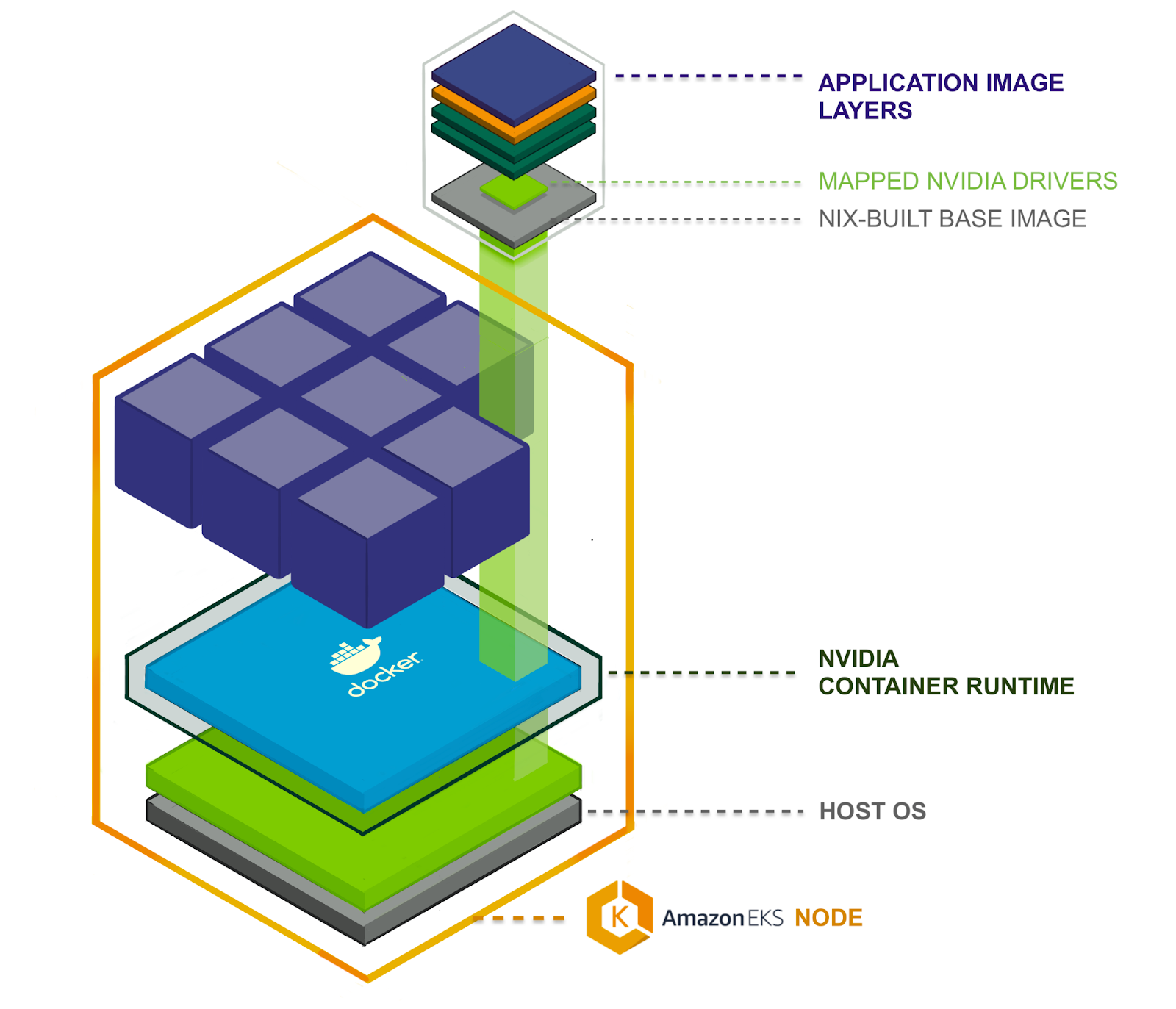
To run a GPU-accelerated application in a k8s compute cluster we use multiple components. From bottom to top, the components needed are connected together. At the bottom is a host OS running in a VM as a k8s node. On top of that sits the container runtime, including extensions for GPU interoperability. Then a GPU device mapper allows individual containers to connect via NVIDIA device driver to the underlying GPU hardware.
From there, the container image stack matters. We start from the Nix base container image built using Nix’s docker tools, containing only the essential files required to run our GPU accelerated Python applications. On top of that we layer the application container image, bundling in the GPU-enabled Python framework (PyTorch or Tensorflow) and Python application code, adding only application source code and third-party Python package files such as PyTorch or Tensorflow.
Host OS, drivers, and container runtime
Canva uses AWS EKS to run k8s clusters, where EKS has nodes for GPU-accelerated applications, introducing the ‘EKS-Optimized AMI with GPU Support’. This Amazon Machine Image (AMI) became a younger, fatter sibling to the ‘EKS-Optimized AMI’, adding a few important components on top of its predecessor.
The host OS for the GPU-supporting AMI is Amazon Linux 2 (Amazon Linux 2018.03), just like the standard EKS AMI, but layered in are NVIDIA drivers and a container runtime. So the AMI contains the first few layered components in our GPU stack.
Container runtime
The NVIDIA container runtime is a direct dependency of the NVIDIA container toolkit, which is a container runtime library and utilities to automatically configure containers to use NVIDIA GPUs. That library is “a simple CLI utility to automatically configure GNU/Linux containers leveraging NVIDIA hardware.”
The nvidia-container-runtime itself claims to be a “modified version of runC adding a custom pre-start hook to all containers”. This allows us to run containers that need to interact with GPUs. The default version of runC can do a lot (see _Introducing runC: a lightweight universal container runtime), but it can’t make NVIDIA’s GPU drivers available to containers, so NVIDIA wrote this modified version.
GPU device mounting in Kubernetes
A driver is no use without a device to drive; something needs to hook up the GPU device to the container. Within k8s the NVIDIA/k8s-device-plugin does this. It is responsible for mapping particular devices into the container’s file system at /dev/. It does not mount the NVIDIA driver libraries as they are handled beforehand by the NVIDIA container runtime.
The k8s-device-plugin is a k8s daemonset which means at least one plugin server is run on each node, cooperating with the node’s kubelet. The plugin’s responsibility is to register the node’s GPU resources with the kubelet, keep track of GPU health and help kubelet respond to GPU resources being requested in the container specs which looks like:
resources:
  limits:
    nvidia.com/gpu: 2 # requesting 2 GPUs
When a node’s kubelet receives a request like this it looks for the matching device plugin (in this case the k8s-device-plugin) and initiates the allocation phase, within which the device plugin sets up the container with the GPU devices, mapping them into /dev/ in the container’s filesystem. On container stop a prestop hook is called where the device plugin is responsible for unloading the drivers and resetting the devices ready for the next container.
Nix-based base images
Having covered the host OS, drivers, special container runtime, and how GPU devices are connected to containers within Kubernetes, we have an idea of how a containerized process acquires driver files and gets hooked up to a host GPU device. But if our application code is going to find the GPU and enjoy accelerated number crunching, that containerized process must spawn from a valid image.
Let’s explore the container images that run our platform user’s code, beginning with the Nix-built base layer provided by Canva’s ML Platform team. But first, I’ll touch on why we’d want to construct our GPU base images FROM scratch using Nix, and not just adopt the official NVIDIA images.
Why build container images with Nix?
An OCI is just a stack of tarballs and mostly built using Dockerfile, but it does not necessarily need to be done via Dockerfile. You can ditch the docker daemon and build using kaniko as well, or you can build using Nix, specifically Nix’s dockerTools.buildImage functionality.
This is not the easiest way to acquire a GPU-supporting base image. The easy way would be to use nvidia/cuda:11.2-cudnn8-runtime-ubuntu20, which gets the job done. But within Canva’s infrastructure group, we’re making long-term investments in Nix’s reproducible build technology for improved software security and maintenance.
Reproducible builds prevent software supply chain attacks. In non reproducible build systems some build input might become unknowingly and undetectably compromised, introducing vulnerabilities and backdoors into a deployed software artefacts assumed safe and trusted.
Reproducible builds are also far more maintainable. Between organizations and within Canva itself, we can exchange build recipes that have sufficient detail for system understanding (know what you’re using) and resistance against ‘works on my machine’ confusion.
With Nix, a purely functional package manager, we can begin to maintain understanding and control of our systems and step closer to realising within the software industry the manufacturing industry’s long accepted ‘bill of materials’ idea.
Putting it all together
A host k8s node has the NVIDIA driver files and special GPU container runtime, which looks for an environment variable, NVIDIA_DRIVER_CAPABILITIES, telling it to mount files from host to container. The node’s kubelet and the installed GPU device manager plugin manage the GPU devices themselves, marrying them with containers needing mega-matrix-multiplying speed.
Assemble all this and you have the bare minimum GPU setup on k8s. If you’re just using PyTorch, that bundles its CUDA dependencies so keep it simple and slim in the container base.
You don’t need to use NixOS to use Nix :)