The Architecture of Copying and Pasting Images on the Web
A deep dive into what actually happens when you copy an image from one website and paste it into another.
Copying an image from one website and pasting it to another. No downloads, no temporary files, no dragging things to your desktop. Just Ctrl+C -> Ctrl+V and the image shows up as if it teleported across the web.
To understand how this works internally we need to understand the sandboxed renderer processes, serializing internal memory structures, navigating the inter-process communication (IPC) frameworks of the host OS, interfacing with legacy and modern clipboard APIs across platforms, and ultimately reconstructing the data into a secure, scriptable Object within a distinct Document Object Model (DOM).
This article dives deep into this exact feature, detailing the lifecycle of a copied image starting from the browser’s rendering engine, traversing through macOS, Windows, and Linux (both X11 and Wayland) OS clipboards, and securely re-entering a sandboxed web application.
Browser-Side Copy Operation
The operation initiates when a user triggers a context menu over an image element and selects “Copy Image.” This action bypasses standard JavaScript clipboard API interceptions, which are typically gated by ClipboardEvent.clipboardData, and directly invokes the browser’s internal native handlers.
Image Retrieval from the Rendering Engine
When “Copy Image” is invoked, the browser must extract the visual data. Modern layout engines, such as Blink in Chrome, Gecko in Firefox, or WebKit in Safari, do not simply fetch the image from the network cache. While the compressed original bytes might exist in the HTTP disk or memory cache, a rendered image may have been modified by CSS, transformed, or drawn to an HTML5 <canvas>.
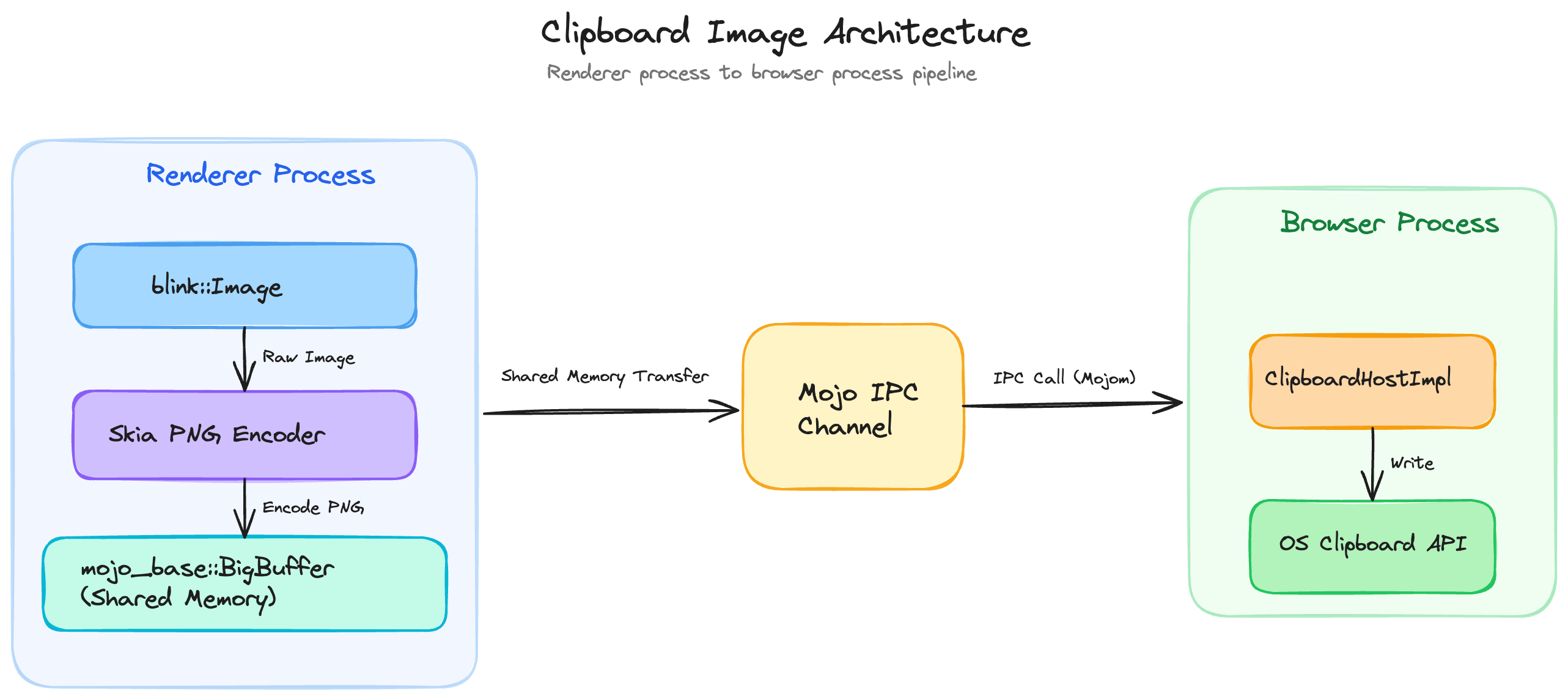
Instead, the browser’s rendering subsystem extracts the fully decoded bitmap currently residing in memory. In Chromium’s Blink engine, images are represented via the blink::Image abstraction.
Specifically, a BitmapImage (which often wraps an SkBitmap or SkImage from the Skia graphics library) contains the raw pixel data. If the browser employs hardware-accelerated compositing, the SkImage may reside in GPU VRAM as an OpenGL texture or Vulkan buffer.
To place this on the CPU-bound OS clipboard, the engine must perform a GPU readback - A computationally expensive operation where pixels are copied from VRAM back into system RAM via glReadPixels or equivalent APIs, converting the hardware texture back into a software SkBitmap.
Generation of Internal MIME Representations
The OS clipboard is entirely format-agnostic; it acts as a generic key-value store where keys are format identifiers and values are binary blobs. To ensure the highest probability of successful pasting into diverse native applications, the browser generates multiple simultaneous representations of the image.
A single “Copy Image” action typically generates several internal representations before they are mapped to OS-specific formats. First, the engine re-encodes the raw SkBitmap pixel data into a standard compressed format, overwhelmingly image/png. This re-encoding step is crucial as it ensures a standardized file header and strips out malformed or proprietary data chunks.
Second, the browser generates an HTML fragment representing the image, labeled as text/html. This often embeds the image as a Base64 encoded Data URI or provides an <img> tag pointing to the source URL.
<meta charset='utf-8'>
<img src="data:image/png;base64,iVBORw0KGgoAAAANSUhEUgAAAAEAAAABCAYAAAAfFcSJAAAADUlEQVR42mP8/5+hHgAHggJ/PchI7wAAAABJRU5ErkJggg=="
     alt="Description"
     width="500"
     height="300">
Finally, the absolute URL of the image is provided as text/plain as a fallback for text-only paste targets.
It’s important to know the difference between the 2 copy operations presented to the user. The “Copy Image” command extracts the decoded bitmap, re-encodes it, and places the binary blob on the clipboard alongside HTML and Text fallbacks.
Conversely, “Copy Image Address” simply extracts the src attribute from the DOM node and places it on the clipboard exclusively as text/plain.
Inter-Process Communication and Memory Ownership
Because web pages execute in highly restricted, sandboxed “Renderer” processes, they lack the operating system privileges required to interact with the global system clipboard directly. The Renderer must therefore serialize the extracted image and transmit it to the highly privileged “Browser” process.
In Chromium, this boundary is crossed using Mojo, a lightweight message passing system. The Blink pasteboard implementation, specifically blink::Pasteboard::writeImage, formulates an IPC message historically routed via ClipboardHostMsg_WriteImage and now managed via strongly typed Mojo interfaces.
Image data is inherently large. Passing a multi-megabyte decoded bitmap over a standard UNIX domain socket or named pipe via standard message serialization would introduce massive latency and memory duplication. To circumvent this, Mojo utilizes a structure called mojo_base.mojom.BigBuffer.
When a payload exceeds a specific threshold, BigBuffer transparently shifts from an inline byte array to a BigBufferSharedMemoryRegion. The Renderer process requests the OS to allocate an anonymous shared memory segment, writes the encoded PNG bytes into it, and sends merely the file descriptor (or Windows Handle) and size over the Mojo IPC channel.
The Browser process maps this shared memory into its own address space, allowing zero-copy transmission of the image payload across the process boundary. Once the Browser process receives this message, the ClipboardHostImpl verifies the data, manages sequence tokens to prevent race conditions, and interfaces with the OS-specific clipboard APIs.
Architectural Diagram: Browser Process Boundary
OS Specific Clipboard Layer Architecture
Clipboards vary across different OSes. The browser must translate its internal web-standard MIME types into the native data structures expected by macOS, Windows, and Linux to ensure seamless interoperability with native applications.
Windows Win32 Clipboard API
On Windows, the clipboard is a shared system resource accessed via the legacy Win32 API. When Chromium’s ClipboardWin::WriteBitmap executes, it translates the incoming SkBitmap into Device Independent Bitmap (DIB) formats.
Windows historically relies on CF_BITMAP (a GDI handle), CF_DIB, and CF_DIBV5. Because standard CF_DIB does not reliably support alpha channels for transparency, modern browsers write CF_DIBV5, which includes a BITMAPV5HEADER specifying color masks, color space information, and alpha values. However, due to rampant bugs in legacy software, such as Microsoft Office mishandling CF_DIBV5 alpha channels resulting in black backgrounds browsers also explicitly write a standardized PNG format blob.
Thus, the Windows clipboard receives both DIB formats and a raw PNG blob. The order of format registration is vital, browsers prioritize the PNG format so that aware applications select it over the lossy or buggy DIB representations.
macOS NSPasteboard
Apple’s macOS handles clipboard operations via the NSPasteboard class, which acts as a client-side Objective-C wrapper around the pbs (pasteboard server) background daemon. The general pasteboard (NSPasteboard.generalPasteboard) manages data copying across the system.
WebKit and Chromium translate their internal representations into UTIs. An image is registered under public.png (or NSPasteboardType.png / NSPasteboardTypePNG). HTML fallbacks are registered as public.html or the proprietary Apple Web Archive format.
When the browser writes to NSPasteboard, it packages the image into an NSPasteboardItem. Unlike Windows, which requires transferring global memory handles, macOS utilizes Mach ports to transfer data to the pbs daemon’s address space. For extremely large files, macOS supports “promised data” (NSFilePromiseProvider), where the clipboard merely holds a reference and defers materialization until the drop or paste occurs. However, for standard web images, the binary PNG is written directly to the pasteboard using setData:forType:.
Linux X11 Selection Model
The X Window System (X11) does not inherently possess a global “clipboard buffer” that stores binary data like Windows or macOS. Instead, X11 relies on “Selections” specifically the CLIPBOARD selection, managed via the ICCCM standard.
When a user copies an image in Firefox or Chrome on X11, the browser calls XSetSelectionOwner, claiming ownership of the CLIPBOARD atom. No image data is transferred to the X server at this point. The browser merely registers itself as the owner. When a user switches to Website B and triggers a paste, the receiving application calls XConvertSelection. The X server sends a SelectionRequest event to the owner (the browser process that copied the image). The requesting application asks for the TARGETS atom to discover what formats are available. The copying browser responds with a list of atoms corresponding to MIME types, such as image/png and text/html.
Once the receiving app requests image/png, the copying browser writes the PNG data to a property on the receiving application’s X window using XChangeProperty. However, the X11 protocol has a maximum request size. For large images, the transfer must be negotiated using the INCR protocol. The data is chunked, often in 256KB increments, requiring a complex state machine of SelectionNotify and PropertyNotify events to stream the image from the sending process to the receiving process memory.
Linux Wayland Clipboard Protocol
Wayland modernizes Linux display architecture by entirely removing the X Server and substituting a secure compositor protocol. Like X11, Wayland lacks a global memory buffer; it is a pure peer-to-peer IPC mechanism mediated by the compositor.
When an image is copied, Chromium’s Ozone/Wayland backend creates a wl_data_source and calls wl_data_source_offer, indicating to the compositor that it possesses image/png. The browser then calls wl_data_device_set_selection to assert ownership.
When pasting, the receiving application asks for the data by sending a wl_data_offer.receive request to the compositor, specifying the MIME type and passing a file descriptor (fd), which is typically one end of a UNIX pipe. The compositor forwards this pipe to the copying browser via a wl_data_source.send event. The copying browser then writes the raw PNG binary data directly into the file descriptor and closes it.
// Architectural Pseudocode for Wayland Data Offer Reception
void wl_data_offer_receive(struct wl_data_offer *offer,
                           const char *mime_type,
                           int fd) {
    // The browser receives the request, writes PNG bytes into 'fd'
    write(fd, png_binary_data, png_size);
    // Closing the file descriptor signals EOF to the receiving application
    close(fd);
}
This file-descriptor-passing model provides excellent performance and security, as massive binary blobs are streamed directly through kernel pipes without passing through a middleman server, avoiding memory duplication.
Pasting into Website B (Reverse Flow)
When the user navigates to Website B and presses Ctrl+V (or Cmd+V), the flow reverses, but introduces significant security checkpoints, sanitization requirements, and DOM API layers.
Gating and Security Checks
Pasting is an inherently dangerous operation. A malicious website could silently read the user’s clipboard, stealing passwords or personally identifiable information (PII) copied from external applications. Consequently, browsers mandate that paste events are heavily gated by “transient user activation” - a recent interaction like a physical click or keypress.
If the site attempts to read the clipboard programmatically via the Async Clipboard API (navigator.clipboard.read()), the browser invokes the Permissions API. If the clipboard-read permission has not been explicitly granted, the browser pauses script execution and displays a native permission prompt to the user.
Receiving the Paste Event and OS IPC
Once authorized, the Browser process requests data from the OS clipboard. On Windows, it calls GetClipboardData for formats like CF_DIBV5 or PNG. On macOS, it requests data from the NSPasteboard. On Wayland, it provides a pipe file descriptor to wl_data_offer_receive and reads the incoming stream.
Before this data is allowed back into the sandboxed Renderer process of Website B, it must be aggressively sanitized. An OS clipboard could contain a malformed image crafted to exploit vulnerabilities in libraries like libpng or libjpeg. Furthermore, an image might contain hidden EXIF metadata, such as GPS coordinates, representing a massive privacy violation if unknowingly pasted into a web form.
To mitigate this, the Browser process passes the raw binary blob to a sandboxed utility process. Here, the image is decoded back into an uncompressed bitmap, strictly discarding any metadata, ICC profiles, or malformed chunks. It is then securely re-encoded back into a clean PNG. This sanitized payload is passed via Mojo BigBuffer to Website B’s Renderer process.
DOM Paste Event Flow and DataTransfer
Inside the Renderer, the JavaScript engine fires a paste event on the active DOM element. The event object (ClipboardEvent) contains a DataTransfer property. The engine parses the multiple MIME types provided by the OS and exposes them via the event.clipboardData.items list. This DataTransfer infrastructure is heavily shared with the HTML5 Drag-and-Drop API, utilizing identical underlying C++ data objects to represent the transferring payload.
Because reading heavy binary blobs synchronously would freeze the browser’s main thread, the DataTransfer object utilizes delayed materialization. When a developer loops through clipboardData.items and calls item.getAsFile(), the browser instantiates a JavaScript File (a subclass of Blob). The backing memory for this Blob is a pointer to the shared memory or cached byte array established during the IPC phase.
Different DOM elements handle the default paste behavior differently:
- contenteditable elements: The browser’s editing commands parse the incoming
text/htmlpayload from the clipboard. If an image is present, it generates an<img>tag and attempts to insert it into the DOM. If the image is a raw binary, it may be converted into a Base64 data URI. - textarea elements: These inputs accept only plain text. The browser aggressively filters the clipboard, stripping all HTML tags and ignoring binary image blobs, pasting only the fallback
text/plainURL if available. <input type="file">elements: The browser intercepts the paste event and populates the input’sFileListwith the reconstructedFileobject, mimicking the behavior of a user manually selecting a file from the disk.
Async Clipboard API vs. Legacy Clipboard
The legacy document.execCommand('paste') and synchronous ClipboardEvent flow inherently block the main thread. To support modern, rich web applications, browsers have implemented the Async Clipboard API.
When navigator.clipboard.read() is called, it returns a Promise. The browser engine asynchronously queries the OS clipboard, performs the heavy decoding and sanitization off the main thread, and resolves the Promise with an array of ClipboardItem objects. The developer then calls item.getType('image/png'), which returns a secondary Promise resolving to the binary Blob. This completely asynchronous model allows the transfer of multi-megabyte images without degrading UI responsiveness or causing frame drops.
Full End-to-End Data Flow
The following sequence details the complete low-level trace from the initial render on Website A to the final DOM insertion on Website B.
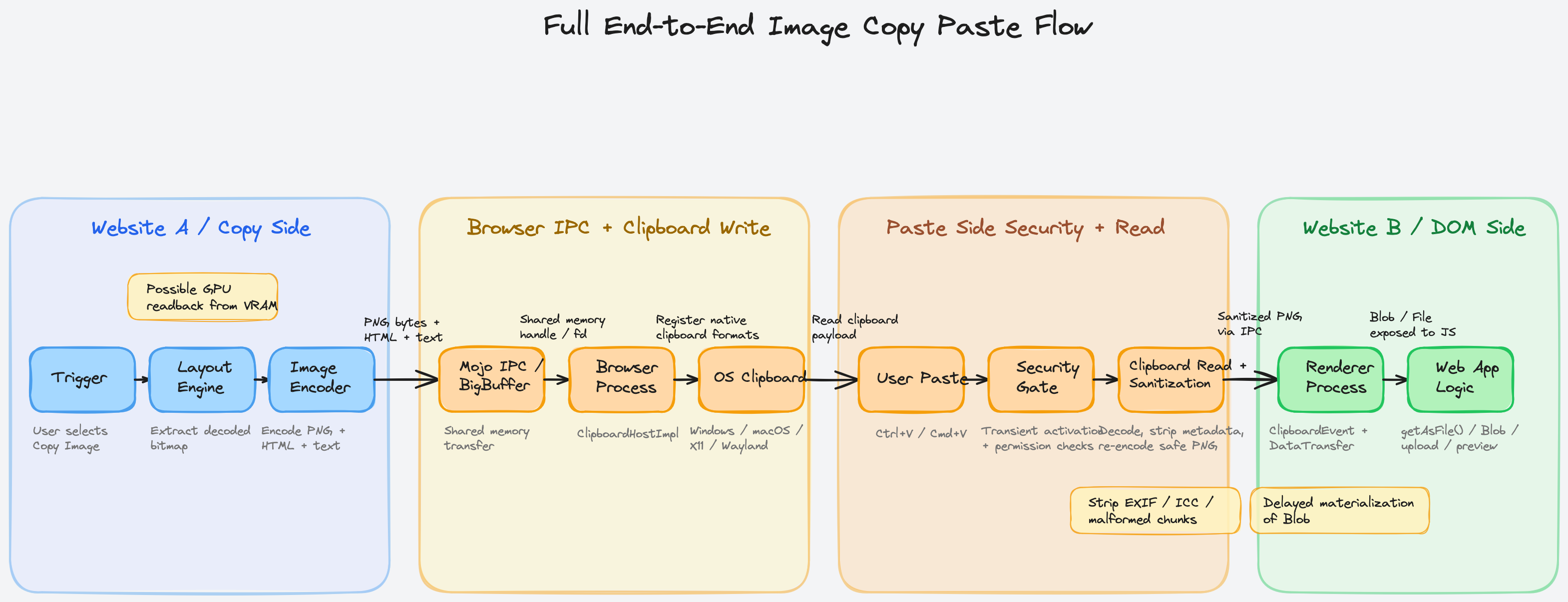
| Phase | Component | Technical Action / Memory Transition |
|---|---|---|
| 1. Trigger | Website A (Renderer) | User right-clicks and selects “Copy Image”. The browser intercepts the native OS menu command, bypassing JS listeners. |
| 2. Extraction | Layout Engine (Blink/Gecko/WebKit) | Decoded bitmap (SkBitmap or equivalent) is extracted from the render tree. If hardware-accelerated, a GPU-to-CPU readback occurs. |
| 3. Encoding | Image Encoder | The uncompressed bitmap is synchronously encoded into compressed PNG bytes. HTML and Text fallbacks are generated. |
| 4. IPC Send | IPC Framework (Mojo) | The Renderer allocates an anonymous shared memory segment, writes the PNG bytes, and sends a BigBuffer file descriptor to the Browser Process. |
| 5. OS Registration | OS Clipboard API | Browser Process maps the shared memory and registers the data with the OS. Windows: GlobalAlloc + SetClipboardData. macOS: NSPasteboard + pbs. Linux: Asserts CLIPBOARD ownership or Wayland wl_data_device_set_selection. |
| Context Switch | Operating System | The user switches the active window or tab to Website B, transferring application focus. |
| 6. Trigger Paste | Website B (Renderer) | User presses Ctrl+V. The browser initiates a paste sequence, checking for transient user activation to authorize the action. |
| 7. OS Query | OS Clipboard API | Browser Process requests data. Windows/Mac: Reads memory handles/ports. Linux Wayland: Provides a UNIX pipe fd to wl_data_offer_receive and reads the streamed bytes. |
| 8. Sanitization | Utility Process | The raw OS binary is decoded into a pixel array, stripping EXIF data, ICC profiles, and malformed chunks to neutralize exploits, then re-encoded into a safe PNG. |
| 9. IPC Receive | IPC Framework (Mojo) | The Browser process sends the sanitized PNG via a new BigBuffer shared memory region to Website B’s Renderer. |
| 10. DOM Exposure | JavaScript Engine (V8/SpiderMonkey) | The Renderer constructs a ClipboardEvent. The DataTransferItemList is populated. The script invokes getAsFile(), generating a delayed-materialization JS Blob. |
| 11. Application | Website B Logic | The application reads the Blob, uploads it via fetch(), or displays it using URL.createObjectURL(). |
Cross-Browser Architectural Differences
While the general copy-paste pipeline remains conceptually consistent, the internal mechanisms and data structures diverge significantly based on the browser engine architecture.
Chrome (Blink)
Blink prioritizes multi-process security and performance. Its use of Mojo BigBuffer for memory transfers ensures that IPC bottlenecks are minimized, avoiding redundant memory copying. Chromium explicitly manages format prioritization on Windows, placing PNG ahead of CF_DIBV5 to appease applications like Microsoft Word, which possess buggy CF_DIBV5 decoders. Furthermore, Chrome leads the implementation of the Async Clipboard API and recently introduced the unsanitized option to allow specific trusted payloads to bypass the strict image re-encoding step when absolute fidelity is required.
Firefox (Gecko)
Firefox’s architecture relies on the nsIClipboard interface. Data is bundled into an nsITransferable object, which manages various “flavors” (MIME types). A persistent architectural difference in Firefox is its handling of string encodings over X11, often utilizing UTF-16, which has historically caused translation issues with native Java applications expecting UTF-8. Furthermore, Firefox is highly aggressive in providing CF_HDROP (file drop) formats alongside standard image bitmaps, making pasted images appear as physical files to certain OS targets, which can improve compatibility with legacy file managers. Firefox also heavily utilizes kSelectionClipboard to support middle-click paste natively on Linux environments.
Safari (WebKit)
WebKit’s pasteboard implementation (Pasteboard.h and PlatformPasteboardIOS.mm) is tightly integrated with Cocoa paradigms. It directly translates web types into Apple UTIs, such as mapping image/png to public.png and HTML to Apple Web Archive formats. Because Safari runs predominantly on macOS and iOS, it extensively utilizes NSItemProvider to handle promised data, interacting deeply with the pasteboard server (pbs). WebKit handles user activation differently than Blink, requiring developers to resolve ClipboardItem Promises within a very strict, synchronously triggered scope to prevent security exceptions, addressing specific iOS sandbox constraints.
Edge Cases and Protocol Complexities
The standard copy-paste flow is routinely complicated by edge cases involving web specifications, proprietary media types, and strict privacy boundaries.
Cross-Origin Images and CORS Implications
If Website A embeds an image from a different domain (e.g., cdn.example.com), the Same-Origin Policy prevents JavaScript from reading the pixels of that image. If a script draws a cross-origin image to an HTML5 <canvas>, the canvas becomes “tainted,” and calling getImageData() or toBlob() will throw a security exception unless the server provided an Access-Control-Allow-Origin (CORS) header.
However, the native “Copy Image” context menu is a trusted user action initiated outside of the DOM’s execution environment. The browser’s internal C++ handlers possess absolute access to the render tree’s memory and can successfully extract the SkBitmap and write it to the OS clipboard, bypassing CORS entirely. If Website A wishes to implement a custom “Copy” button using the Async Clipboard API, it must obey CORS and utilize crossOrigin="Anonymous" when fetching the image, or the operation will fail.
Copying Animated GIF and WebP
Animated formats present a severe limitation for OS clipboards. Binary formats like CF_DIB on Windows or public.png on macOS are fundamentally designed for static bitmaps. When a user copies an animated GIF via the context menu, the browser typically extracts the currently visible frame from the render tree, encodes it as a static PNG or Bitmap, and places it on the clipboard. Consequently, pasting the GIF into a chat application often results in a static, frozen image. To preserve animations, browsers attempt to write the HTML representation (<img src="...gif">) or file paths (CF_HDROP), relying on the receiving application to parse the HTML or file reference rather than the raw bitmap.
Copying SVG Images
Scalable Vector Graphics (SVG) are mathematically defined paths rather than rasterized pixels. When “Copy Image” is invoked on an <svg> element, the browser cannot easily map it into a generic CF_DIB. Instead, the browser rasterizes the SVG to a target resolution, generating a standard PNG pixel buffer, and places that on the clipboard. Alternatively, the raw XML text of the SVG is placed into the text/html or text/plain slots, enabling vector editors like Adobe Illustrator to reconstruct the mathematical paths from the markup.
Private / Incognito Mode Restrictions
Browsers operate with extreme caution regarding clipboard data in private browsing modes. While data can be copied to the global OS clipboard (as it is the user’s explicit intent), caching the intermediate chunks on disk is strictly prohibited. For massive clipboard transfers (like macOS file promises or Linux Wayland pipe spools) that might ordinarily spill to the filesystem to save memory, the browser must force everything to remain in anonymous volatile memory to ensure no forensic traces survive process termination.
Final Thoughts
Most of the time we never notice any of this, and that’s kind of the point. Modern browsers are designed so that these complexities disappear behind simple user interactions.
Not bad for something we do dozens of times a day.