Reverse-Engineering Claude Code: A Deep Dive into Anthropic's AI-Powered CLI
An exhaustive technical analysis of the architecture, systems, and engineering behind Claude Code — Anthropic's flagship developer tool.
Table of Contents
- Introduction: What is Claude Code?
- High-Level Architecture
- Startup: The Race Against Time
- The Query Engine: Brains of the Operation
- The Tool System: 60+ Tools Behind a Single Interface
- The Permission System: Safety at Every Layer
- Terminal UI: React, but for Your Terminal
- The Command System: 100+ Slash Commands
- Skills, Plugins, and MCP: The Extensibility Trifecta
- Context Management: Fighting the Token Limit
- State Management: Immutable Store for a Mutable World
- Session Persistence and History
- Multi-Agent Architecture: Subagents, Swarms, and Worktrees
- Error Recovery: A System That Refuses to Crash
- Cost Tracking and Telemetry
- Execution Modes: One Codebase, Many Faces
- BUDDY: A Tamagotchi-Style AI Pet
- KAIROS: Persistent Assistant Mode and Auto-Dreaming
- ULTRAPLAN: Remote Planning Sessions
- Coordinator Mode: Multi-Agent Orchestrator
- The Memory System: Persistent AI Memory
- Hooks: User-Defined Automation
- Voice Mode, Bridge, and Infrastructure
- Vim Mode, Keybindings, and Developer Ergonomics
- Key Engineering Patterns and Takeaways
- Conclusion
1. Introduction: What is Claude Code?
Claude Code is Anthropic’s official CLI tool — an interactive, AI-powered development assistant that lives in your terminal. It lets developers have natural-language conversations with Claude to edit files, run shell commands, search codebases, manage Git workflows, create pull requests, debug issues, and much more.
But underneath the conversational interface lies a remarkably sophisticated piece of software engineering: a custom React-based terminal renderer, a multi-layered permission system, an elastic tool discovery mechanism, a self-healing query loop with automatic context compression, and an extensibility framework spanning skills, plugins, and the Model Context Protocol (MCP).
This article is a deep technical analysis of the Claude Code source code — approximately 330+ utility files, 45+ tool implementations, 100+ slash commands, 146 UI components, and a custom terminal rendering framework — all written in TypeScript with React, running on Bun.
Let’s take it apart, piece by piece.
2. High-Level Architecture
Claude Code follows a layered architecture where each layer has clear responsibilities:
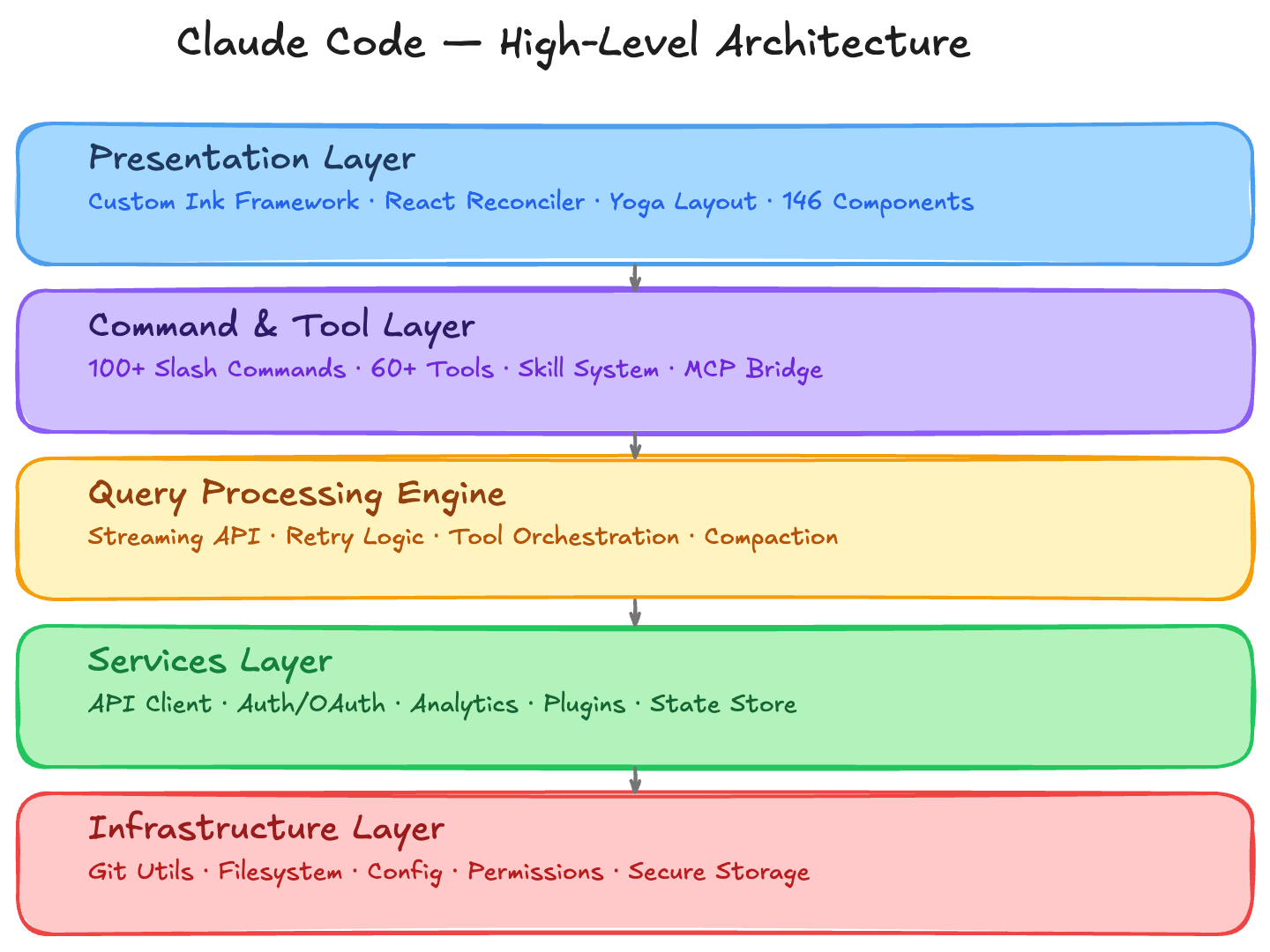
Tech Stack
| Layer | Technology |
|---|---|
| Language | TypeScript (strict mode) |
| Runtime | Bun (with Node.js 18+ compatibility) |
| UI Framework | React 18 with custom terminal reconciler |
| Layout Engine | Yoga (Facebook’s flexbox implementation) |
| API Client | @anthropic-ai/sdk |
| Extensibility | Model Context Protocol (MCP) SDK |
| Validation | Zod (schema-driven I/O for all tools) |
| CLI Framework | Commander.js |
| Linting | Biome + ESLint |
Directory Structure
src/
├── main.tsx                 # Application entry (~800KB, bootstraps everything)
├── QueryEngine.ts           # Conversation management & API orchestration
├── query.ts                 # Query loop state machine (retries, compaction, recovery)
├── Tool.ts                  # Unified tool interface (generic over Input/Output/Progress)
├── tools.ts                 # Tool registry with feature-gated loading
├── commands.ts              # Command registry with lazy dispatch
├── context.ts               # System/user context builder (git, CLAUDE.md, date)
├── cost-tracker.ts          # Per-model usage accumulation and display
├── history.ts               # Session history (JSONL, dedup, paste refs)
├── setup.ts                 # Pre-action configuration and auth
├── entrypoints/             # CLI, SDK, MCP entry points
├── tools/                   # 45+ tool implementations (Bash, FileRead, Agent, etc.)
├── commands/                # 100+ slash command implementations
├── components/              # 146 React terminal components
├── ink/                     # Custom terminal rendering framework (~90 files)
├── services/                # API, analytics, MCP, compact, plugins
├── hooks/                   # 85+ hook implementations
├── state/                   # AppState store (Zustand-like)
├── utils/                   # 330+ utilities (git, config, permissions, etc.)
├── skills/                  # Skill loading, bundled skills
├── keybindings/             # Dynamic keybinding system
├── vim/                     # Full vi/vim mode
├── bridge/                  # CCR bridge (WebSocket to claude.ai)
├── coordinator/             # Multi-agent coordination
├── remote/                  # Remote session management
├── tasks/                   # Background task system
├── migrations/              # Versioned data migrations
└── types/                   # Shared type definitions
3. Startup: The Race Against Time
Claude Code’s startup is aggressively optimized. The goal: minimize time-to-first-render so the developer is never left staring at a blank terminal.
3.1 Parallelized Prefetching
Before any module imports happen, three critical operations fire in parallel:
// main.tsx — lines 1-20, before any other imports
profileCheckpoint('main_tsx_entry')
startMdmRawRead()        // macOS MDM policy read (subprocess)
startKeychainPrefetch()   // OAuth + API key keychain reads (2 subprocesses)
This exploits a clever insight: TypeScript module evaluation takes ~135ms anyway (sequential by nature). By spawning subprocesses immediately, macOS keychain reads (~65ms total) run entirely in parallel with import resolution, becoming effectively free.
3.2 Initialization Sequence
The init() function (memoized to prevent re-entrancy) orchestrates 16 setup stages:
- Config validation — Parse and validate all JSON config files
- Safe environment variables — Apply non-sensitive env vars before trust dialog
- CA certificates — Load extra root CAs before first TLS handshake
- Graceful shutdown handlers — Register
SIGINT/SIGTERMhandlers - OAuth population — Async account info fetch
- IDE detection — JetBrains, VS Code identification
- Remote settings — Fetch managed settings from server (async, awaited later)
- Policy limits — Load org-enforced limits (async)
- First-start timestamp — Analytics marker
- mTLS configuration — Client certificate setup
- Proxy agents — Configure HTTP/HTTPS proxies
- API preconnection — TCP+TLS handshake overlaps with remaining init
- Upstream proxy (CCR) — CONNECT relay for organization credentials
- Shell detection — Windows-specific shell resolution
- LSP manager — Language Server Protocol cleanup handlers
- Team cleanup — Multi-agent swarm cleanup on shutdown
3.3 Fast Paths
Before full initialization, fast paths handle quick-exit commands:
--version— Print version and exit (no init, no React)--dump-system-prompt— Output the system prompt and exitmcp serve— Start MCP server mode (different init path)
3.4 Startup Profiling
A sampled profiler (startupProfiler.ts) measures every phase:
- 100% of internal builds get sampled
- 0.5% of external users are sampled
CLAUDE_CODE_PROFILE_STARTUP=1forces full profiling with memory snapshots
The decision is made once at module load time — non-sampled users pay zero profiling overhead.
3.5 Entrypoint Resolution
The system identifies its execution context early and sets CLAUDE_CODE_ENTRYPOINT:
| Value | Context |
|---|---|
cli |
Interactive terminal session |
sdk-cli |
Non-interactive (print mode, piped) |
mcp |
Running as an MCP server |
local-agent |
Spawned as a subagent |
claude-code-github-action |
GitHub Actions CI |
This gates feature loading — for example, REPL components only load in interactive mode.
4. The Query Engine: Brains of the Operation
The query engine is the core loop that manages conversations with Claude. It’s split across two files: QueryEngine.ts (session-level orchestration) and query.ts (per-turn state machine).
4.1 QueryEngine: The Session Coordinator
The QueryEngine class is a singleton per conversation. It persists state across turns and coordinates:
- System context building (git status, CLAUDE.md files, date)
- Message management (accumulation, normalization, persistence)
- API calls (streaming, retries, fallback)
- Permission tracking (denial counts for SDK reporting)
- Cost accumulation (per-model token tracking)
Key method: submitMessage(prompt, options) — an AsyncGenerator that yields SDK messages throughout the turn. Before entering the query loop, it:
- Creates a file history snapshot (for undo/restore)
- Records the transcript to disk before the API call (even if the process is killed mid-request, the conversation is resumable)
- Wraps
canUseToolto track permission denials
4.2 The Query Loop: A Resilient State Machine
The query() function in query.ts is where the magic happens. It’s a while(true) loop managing a mutable state object:
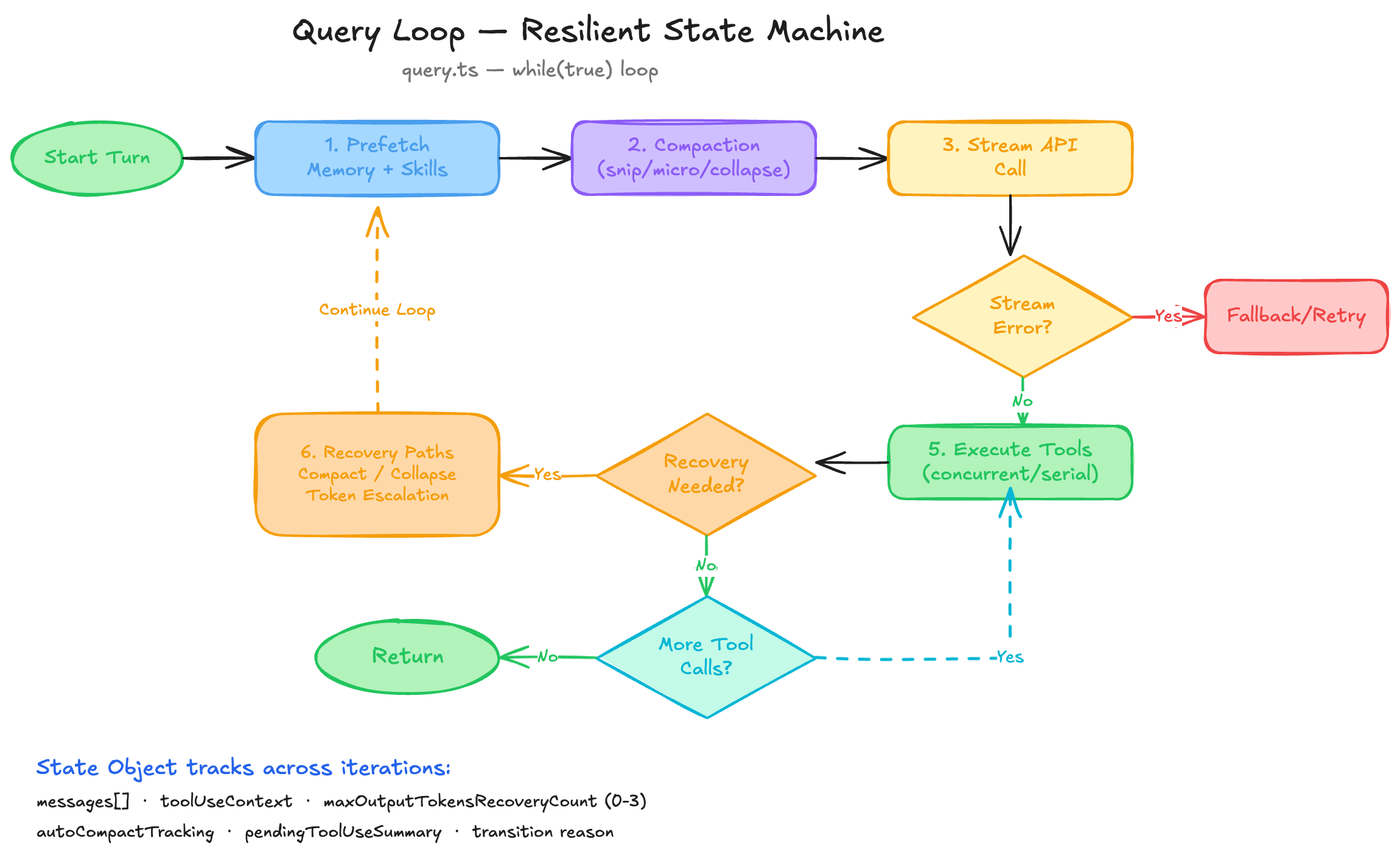
queryLoop():
  while(true):
    1. Prefetch memory + skills (parallel)
    2. Apply message compaction (snip, microcompact, context collapse)
    3. Call API with streaming
    4. Handle streaming errors (fallback, retry)
    5. Execute tools (concurrent or serial)
    6. Check recovery paths (compact, collapse drain, token escalation)
    7. Continue loop or return
The state object tracks everything needed across iterations:
type State = {
  messages: Message[]
  toolUseContext: ToolAvailabilityContext
  maxOutputTokensRecoveryCount: number  // 0–3 limit
  autoCompactTracking: CompactState     // Compaction state + failure count
  pendingToolUseSummary: Promise<...>   // Async tool summaries
  transition: TransitionReason          // Why the loop didn't terminate
}
4.3 Streaming and Tool Execution
The query loop streams API responses and processes them incrementally:
- Stream start — Yields
stream_request_startevent - Accumulation — Collects
assistantMessages,toolUseBlocks,toolResults - Usage tracking — Tracks
currentMessageUsageandlastStopReason - Tool dispatch — Routes tool calls to the orchestrator
Tool execution uses a sophisticated concurrency model:
partitionToolCalls(blocks[]):
  ├─ Batch 1: Read-only tools A, B, C  → runConcurrently(max=10)
  ├─ Batch 2: Write tool D              → runSerially()
  ├─ Batch 3: Read-only tools E, F      → runConcurrently(max=10)
  └─ ...
Each tool’s isConcurrencySafe() method determines if it can run in parallel. Read-only tools (glob, grep, file reads) run concurrently; write tools (edits, bash with side effects) run serially with context propagation between batches.
A streaming tool executor can even begin executing tools while the model is still streaming, reducing latency by overlapping computation and I/O.
4.4 Token Budget Continuation
When the model’s output budget is approaching exhaustion but the task isn’t complete, the engine:
- Injects an invisible meta-message: “Resume directly — no apology, no recap”
- Continues the loop with a
token_budget_continuationtransition - Tracks cumulative tokens without interrupting the user
- Detects diminishing returns to avoid infinite loops
Maximum 3 consecutive output-token recovery attempts before surfacing the stop reason.
5. The Tool System: 60+ Tools Behind a Single Interface
Every tool in Claude Code conforms to a single generic interface:
interface Tool<Input, Output, Progress> {
  name: string
  description(): string          // Dynamic, permission-context-aware
  prompt(): string               // System prompt additions
  inputSchema: ZodSchema<Input>  // Zod → JSON Schema for API

  call(input: Input, context: ToolContext): Promise<ToolResult<Output>>
  checkPermissions(input: Input): PermissionResult
  validateInput(input: Input): ValidationResult
  isConcurrencySafe(input: Input): boolean

  // 4-tier rendering
  renderToolUseMessage(input: Input): ReactNode
  renderToolUseProgressMessage(input: Input, progress: Progress): ReactNode
  renderToolResultMessage(output: Output): ReactNode
  renderToolUseErrorMessage(error: Error): ReactNode

  mapToolResultToToolResultBlockParam(output: Output, id: string): ToolResultBlockParam
}
5.1 The Tool Registry
Tools are loaded through a feature-gated registry:
assembleToolPool(permissionContext, mcpTools):
  1. getTools(permissionContext)        // Filter built-ins by deny rules
  2. filterToolsByDenyRules()           // Remove blanket-denied MCP tools
  3. uniqBy(name)                       // Deduplicate (built-ins win)
  4. sort(name)                         // Alphabetical for prompt cache stability
Sorting by name is a subtle but important optimization: it keeps the tool list in the same order across requests, maximizing prompt cache hit rates on the API side.
5.2 Deferred Tool Discovery
Not all 60+ tools are sent to the model in every request. Tools marked shouldDefer: true are hidden until the model explicitly searches for them via ToolSearchTool:
Model: "I need to create a task..."
  → Calls ToolSearchTool("task create")
  → Returns TaskCreateTool schema
  → Model calls TaskCreateTool in the same turn
~18 tools are deferred: LSP, TaskCreate, MCPTool, SkillTool, EnterPlanMode, etc. This keeps the base prompt under 200K tokens while allowing elastic discovery.
5.3 Key Tool Implementations
BashTool — Command Execution with Guardrails
The most frequently used tool runs shell commands with extensive safety:
- 30K character result limit — Large outputs persist to disk with a preview
- Sandbox awareness — Detects containerized vs. native execution
- Background tasks — Auto-backgrounds commands exceeding 15 seconds
- Search classification — Marks
ls,grep,catoutput as collapsible in the UI - Permission dialogs —
sededits show a preview before execution
FileEditTool — Precision String Replacement
Rather than rewriting entire files, the edit tool does surgical string replacement:
- Old/new string matching — Finds exact occurrences, replaces one or all
- 1 GiB size limit — Prevents OOM on massive files
- Git-aware diffing — Shows before/after diff via
gitDiff() - Undo integration — Plugs into FileHistory for one-click undo
AgentTool — Subagent Spawning
Claude Code can spawn child agents for parallel work:
- Isolation modes — Worktree (isolated git branch) or remote (CCR)
- Model selection — Override with
opus | sonnet | haiku - Background execution — Agents run async with notification on completion
- Named addressing —
SendMessageto named agents for multi-agent coordination - Permission inheritance — Child agents inherit or restrict parent permissions
GrepTool — Content Search (Ripgrep Wrapper)
Wraps rg with sensible defaults for LLM use:
- 250-line default limit — Prevents context flooding
- Multiline mode —
rg -U --multiline-dotallfor cross-line patterns - VCS exclusion — Auto-skips
.git,.svn,.hg - Three output modes — Content, file paths only, or match counts
LSPTool — Language Intelligence
9 operations powered by Language Server Protocol:
goToDefinition,findReferences,hoverdocumentSymbol,workspaceSymbolgoToImplementation,prepareCallHierarchyincomingCalls,outgoingCalls
Only loaded when an LSP server is connected. Deferred by default.
WebSearchTool — Native Web Search
Server-side web search (beta feature):
- Max 8 searches per invocation
- Domain filtering —
allowed_domainsandblocked_domainsparameters - Streaming results — Interleaves text and citation blocks
5.4 Tool Result Budgeting
Every tool has a maxResultSizeChars limit:
| Tool | Limit |
|---|---|
| BashTool | 30,000 chars |
| GrepTool | 20,000 chars |
| FileReadTool | Infinity (never persists) |
When output exceeds the limit, it’s saved to ~/.claude/tool-results/{uuid}/output.txt and the model receives a preview with a file reference. FileReadTool is exempt because persisting its output would create a circular dependency (Read → persist → model reads persisted file → …).
5.5 Lazy Schemas
Tool input schemas use a lazySchema() factory that defers Zod instantiation:
const schema = lazySchema(() => z.object({
  command: z.string(),
  timeout: z.number().optional(),
}))
This prevents circular import cycles (Tool.ts ← tools/ ← Tool.ts) and enables mid-session schema changes when feature flags flip.
6. The Permission System: Safety at Every Layer
Claude Code’s permission system is one of its most sophisticated subsystems — a multi-layered defense that balances safety with developer productivity.
6.1 Permission Modes
Five public modes control the default behavior:
| Mode | Behavior |
|---|---|
default |
Ask for destructive operations |
plan |
Read-only + AskUserQuestion (design phase) |
acceptEdits |
Auto-approve file edits, ask for shell |
bypassPermissions |
Full access (dangerous, opt-in) |
dontAsk |
Auto-deny unsafe commands |
Plus two internal modes:
auto— ML classifier evaluates each commandbubble— Internal delegation to parent agent
6.2 Rule System
Permission rules form a priority cascade:
type PermissionRule = {
  source: 'userSettings' | 'projectSettings' | 'localSettings' | 'cliArg' | 'session'
  ruleBehavior: 'allow' | 'deny' | 'ask'
  ruleValue: { toolName: string, ruleContent?: string }
}
Rules support glob patterns: Bash(git push*) allows any git push command, Bash(python:*) allows all Python commands.
6.3 Decision Pipeline
For every tool call:
1. validateInput()        → Tool-specific validation (size limits, blocked patterns)
2. checkPermissions()     → Rule matching + classifier + hooks
3. Decision:
   ├─ allow  → Execute immediately
   ├─ deny   → Return error to model
   └─ ask    → Show permission dialog to user
4. Pre/Post hooks         → Can modify input or block execution
6.4 Dangerous Pattern Detection
The system identifies permission rules that are too broad to auto-allow:
- Tool-level allow (no content restriction) — Would allow ALL commands
- Interpreter prefixes —
python:*,node:*,ruby:*(arbitrary code execution) - Wildcards —
*,python*(too permissive)
6.5 Three-Way Permission Result
Every permission check returns a typed union:
type PermissionResult =
  | { behavior: 'allow', updatedInput?: Input }   // Hooks can modify input
  | { behavior: 'ask', message: string }           // Prompt user
  | { behavior: 'deny', message: string }          // Block with explanation
The updatedInput field is powerful: pre-execution hooks can transparently modify tool parameters (e.g., adding safety flags to shell commands).
7. Terminal UI: React, but for Your Terminal
Perhaps the most impressive subsystem in Claude Code is its custom terminal rendering framework — a complete reimplementation of React rendering for terminal environments, rivaling web browsers in sophistication.
7.1 The Rendering Pipeline
React Components
    ↓
Custom React Reconciler (createReconciler API)
    ↓
Virtual DOM Tree (ink-box, ink-text, ink-root, ink-link)
    ↓
Yoga Layout Engine (flexbox calculations)
    ↓
Output Builder (write / blit / clip / clear / shift operations)
    ↓
Screen Buffer (2D cell array with interned styles + hyperlinks)
    ↓
Diff Engine (compare with previous frame)
    ↓
ANSI Escape Sequences → TTY
7.2 Custom React Reconciler
Claude Code implements a custom React host configuration using createReconciler:
Element types:
ink-root— Root containerink-box— Flexbox layout container (like<div>)ink-text— Text contentink-virtual-text— Nested text (layout optimization)ink-link— OSC 8 hyperlinksink-progress— Progress indicatorsink-raw-ansi— Raw ANSI passthrough (bypasses measurement)
The reconciler tracks three categories of changes separately:
- Styles — Passed to Yoga for layout recalculation
- Text styles — Colorization, bold, italic, etc.
- Event handlers — Stored separately to prevent handler identity changes from invalidating the dirty flag
7.3 Yoga Layout Engine
Rather than manual ANSI cursor positioning, Claude Code uses Yoga — Facebook’s cross-platform flexbox implementation — for layout:
<Box flexDirection="row" gap={1} paddingX={2}>
  <Box flexGrow={1}>
    <Text>Left panel</Text>
  </Box>
  <Box width={30}>
    <Text>Right sidebar</Text>
  </Box>
</Box>
This brings responsive, declarative layouts to the terminal. Text nodes register measure functions with Yoga:
node.yogaNode.setMeasureFunc((width, measureMode) => {
  const wrapped = wrapText(text, width)
  return { width: actualWidth, height: numLines }
})
A generational reset pattern prevents memory leaks from native Yoga bindings:
if (now - lastPoolResetTime > SESSION_POOL_RESET_MS) {
  migrateScreenPools()  // Free and recreate all Yoga nodes
}
7.4 The Dirty Flag Cascade
Nodes track a dirty flag that cascades upward:
function markDirty(node: DOMElement) {
  node.dirty = true
  if (node.parentNode) markDirty(node.parentNode)
}
Only subtrees with dirty ancestors are re-laid out, providing incremental performance.
7.5 Double Buffering and Blitting
The renderer uses classic graphics techniques:
Double buffering:
private frontFrame: Frame   // Currently displayed
private backFrame: Frame    // Being rendered into
// After render: swap pointers
[this.frontFrame, this.backFrame] = [this.backFrame, this.frontFrame]
Blitting (copy unchanged regions):
blit(src: Screen, x, y, width, height)
// If a region hasn't changed, copy from previous frame
// instead of re-rendering — the "GPU blit" technique for terminals
When a selection overlay is applied, it “contaminates” the frame, disabling blit for the next render to prevent visual artifacts.
7.6 Screen Buffer: The 2D Cell Model
The screen is a 2D array of cells:
type Cell = {
  char: string          // Interned via CharPool
  width: CellWidth      // 1 (normal), 2 (wide/CJK/emoji), -1 (tail of wide char)
  styleId: number       // Interned via StylePool
  hyperlink?: number    // Interned via HyperlinkPool
}
Three interning pools minimize memory and enable O(1) comparisons:
- CharPool — Deduplicates character strings, returns integer IDs
- StylePool — Deduplicates ANSI style combinations, pre-computes transition sequences
- HyperlinkPool — Deduplicates OSC 8 URLs (reset every 5 minutes to bound growth)
The style pool’s transition() method is especially clever:
// Pre-computed: "how to go from style A to style B"
transition(fromId: number, toId: number): string {
  const key = fromId * 0x100000 + toId
  return transitionCache.get(key)  // O(1) vs. diffing AnsiCode arrays
}
7.7 Scroll Optimization
ScrollBox uses hardware scroll regions when available:
CSI top;bottom r    → Set scroll region
CSI n S             → Scroll up n lines (DECSTBM)
This is dramatically faster than rewriting 50+ rows of content. For smooth animation, scroll deltas accumulate and drain at terminal-specific rates:
// Native terminals: proportional drain (~3/4 per frame)
const step = Math.max(MIN, (abs * 3) >> 2)

// xterm.js: adaptive (instant for ≤5, smaller steps for fast scrolls)
const step = abs <= 5 ? abs : abs < 12 ? 2 : 3
7.8 Event System
Events follow DOM semantics with capture and bubble phases:
function collectListeners(target, event): DispatchListener[] {
  // Walk from target to root
  // Capture handlers: root-first
  // Bubble handlers: target-first
}
Event priority mirrors web browsers:
| Priority | Events |
|---|---|
| Discrete (sync) | keydown, keyup, click, focus, blur, paste |
| Continuous (batched) | resize, scroll, mousemove |
7.9 Text Selection
Full text selection with word and line modes:
- Character mode — Drag selects character by character
- Word mode — Double-click selects word; subsequent drag extends by word boundaries
- Line mode — Triple-click selects line; drag extends by lines
- Scroll tracking — Text that scrolls off-screen is accumulated for correct copy
- Soft-wrap handling — Wrapped lines are joined into logical lines when copying
7.10 Keyboard Input Parsing
Terminal keyboard input is notoriously ambiguous. The parser handles multiple protocols:
- Kitty Keyboard Protocol —
CSI uwith codepoint + modifiers - xterm modifyOtherKeys —
CSI 27; modifier; keycode ~ - Legacy function keys — F1-F12 with their many escape sequence variants
- SGR mouse events —
CSI < button; col; row M/m - Terminal identity detection — XTVERSION response parsing for feature detection
8. The Command System: 100+ Slash Commands
8.1 Architecture
Commands use a declarative registration model with three types:
| Type | Execution Model | Example |
|---|---|---|
PromptCommand |
Expands to text sent to Claude | /commit, /review |
LocalCommand |
Synchronous text output, no UI | /clear, /help, /status |
LocalJSXCommand |
React component rendered to terminal | /config, /mcp, /doctor |
The command registry is memoized and lazy-loaded:
const COMMANDS = memoize(() => [
  // Static commands array — module imports deferred until first call
])

const loadAllCommands = memoize((cwd: string) => {
  // Merges: COMMANDS() + skills + plugins + workflows + MCP commands
})
8.2 Command Discovery Pipeline
getCommands(cwd)
  ├─ loadAllCommands(cwd) [memoized by CWD]
  │   ├─ getSkills()          → Disk, bundled, plugin, MCP skills
  │   ├─ getPluginCommands()  → Marketplace + built-in plugins
  │   ├─ getWorkflowCommands()→ Automation workflows [feature-gated]
  │   └─ COMMANDS()           → Static built-in commands
  ├─ getDynamicSkills()       → Session-discovered skills
  ├─ Filter by availability   → Auth provider gating
  ├─ Filter by isEnabled()    → Feature flag gating
  └─ Dedupe + sort
8.3 Remote and Bridge Filtering
Commands are pre-filtered based on execution context:
- Remote mode — Only
REMOTE_SAFE_COMMANDS(session, exit, clear, help, theme, cost…) - Bridge mode — Only
BRIDGE_SAFE_COMMANDS(prompt-type skills, plus text-output locals like clear, cost, summary) - Local JSX commands — Always blocked over bridge (can’t render React over WebSocket)
8.4 Notable Command Implementations
/commit — Git Safety Protocol
The commit command enforces strict safety rules:
- Never
git commit --amend(only create new commits) - Never skip hooks (
--no-verify,--no-gpg-sign) - Never use
-iflags (interactive mode unsupported) - Warn on secrets (
.env,credentials.json) - Restricted tool access: only
Bash(git add:*),Bash(git status:*),Bash(git commit:*)
/init — Interactive Project Setup
Multi-phase onboarding:
- Ask what to set up (CLAUDE.md, skills, hooks)
- Survey codebase (manifest files, README, CI, existing config)
- Interview user on gaps
- Synthesize proposal and create artifacts
/doctor — Self-Diagnostics
Checks system health: API connectivity, auth status, model availability, MCP server connections, permission configuration.
9. Skills, Plugins, and MCP: The Extensibility Trifecta
9.1 Skills
Skills are markdown-based prompt templates with frontmatter metadata:
---
name: my-skill
description: What this skill does
whenToUse: When Claude should invoke it
allowedTools: [Bash, Read, Edit]
model: claude-sonnet-4-6
userInvocable: true
---

Skill prompt content here...
Discovery sources (5):
.claude/skills/— Project-level skills~/.claude/skills/— User-level skills- Bundled skills — Compiled into the binary
- Plugin skills — From installed plugins
- MCP skill builders — Auto-generated from MCP servers with Prompt capability
Forked execution: Skills with context: 'fork' run in isolated subagents with their own token budgets, preventing large skills from consuming session context.
Bundled skills support lazy extraction of reference files to disk with per-process nonce-based path protection (defends against symlink/TOCTOU attacks).
9.2 Plugins
Plugins bundle skills, hooks, and MCP servers:
Plugin
├─ Skills (markdown files)
├─ Hooks (pre/post tool execution)
├─ MCP Servers (tool providers)
└─ Options (user-configurable variables)
Types:
- Built-in plugins — Pre-installed, togglable,
{name}@builtin - Marketplace plugins — Installed to
~/.claude/plugins, versioned - Project plugins —
--plugin-dirfor session-only plugins
Plugin variables are substituted into prompts at invocation time via substitutePluginVariables().
9.3 Model Context Protocol (MCP)
MCP is the primary extensibility mechanism for bringing external tools into Claude Code.
Supported transports:
stdio— Local subprocesssse/http/ws— Network-based (with optional OAuth/XAA)sdk— Embedded SDKclaudeai-proxy— Claude.ai tunnel
Config scopes (priority order):
local—.mcp.jsonin project rootproject—.claude/.mcp.jsonuser—~/.claude/.mcp.jsonuserSettings—settings.jsonmcpServerspolicySettings— Managed organizational policyenterprise— Enterprise-managedclaudeai— Claude.ai-manageddynamic— Runtime-injected
Connection lifecycle:
MCPServerConnection =
  | ConnectedMCPServer     → Ready to use
  | FailedMCPServer        → Connection error
  | NeedsAuthMCPServer     → Awaiting OAuth
  | PendingMCPServer       → Reconnecting (max attempts)
  | DisabledMCPServer      → Explicitly disabled
MCP tools are normalized and prefixed: mcp__server__toolname. They receive the same permission checks, deny rules, and analytics as built-in tools.
10. Context Management: Fighting the Token Limit
With conversations that can last hours and generate hundreds of tool calls, managing the context window is critical. Claude Code uses a multi-strategy approach.
10.1 Auto-Compaction
When token count exceeds context_window - 13,000:
- Strip images/documents from older messages (replace with
[image]markers) - Group messages by API round (assistant + tool results)
- Call the compaction model to generate a summary
- Replace old messages with a
CompactBoundaryMessage - Re-inject up to 5 files + skills post-compaction (50K token budget for files, 25K for skills)
A circuit breaker prevents thrashing: max 3 consecutive compaction failures before giving up.
10.2 Microcompaction
Lighter-weight compression for tool results:
- Time-based — Clear tool results older than a TTL
- Size-based — Truncate when accumulated tool result tokens exceed threshold
- Tool-specific — Only compacts: FileRead, Bash, Grep, Glob, WebSearch, WebFetch, FileEdit, FileWrite
- Cache-aware — A “cached” variant preserves prompt cache integrity via
CacheEditsBlock
10.3 Snip Compaction
A history truncation strategy (feature-gated):
- Remove old messages beyond a snip boundary
- Preserve the assistant’s “protected tail” for context continuity
- Track tokens freed for accurate token budget calculations
- Full history preserved in REPL for UI scrollback (non-destructive)
10.4 Context Collapse
Staged collapses are committed lazily — only when the API returns a 413 (prompt too long):
API 413 → Collapse drain (commit staged collapses)
        → If insufficient → Reactive compact (full summarization)
        → If still insufficient → Surface error to user
10.5 System Context
Two tiers of context are injected into every request:
System context (memoized per session):
- Git status (branch, recent commits, file status — truncated at 2000 chars)
- Cache breaker (optional debug injection)
User context (memoized per session):
- CLAUDE.md file contents (auto-discovered from project + parent directories)
- Current date (ISO format)
11. State Management: Immutable Store for a Mutable World
11.1 The Store
Claude Code uses a minimal, Zustand-like store:
type Store<T> = {
  getState: () => T
  setState: (updater: (prev: T) => T) => void
  subscribe: (listener: Listener) => () => void
}
- No middleware
- Synchronous updates
- Identity comparison (
Object.is) gates listener invocation - React integration via
useSyncExternalStore
11.2 AppState: The Unified State Object
The AppState object contains everything:
Core settings:
settings— User preferences (theme, model, etc.)mainLoopModel— Current AI model for the sessiontoolPermissionContext— Safety mode and rules-
expandedView— ‘none’‘tasks’ ‘teammates’
Bridge state (Claude.ai integration):
replBridgeEnabled/replBridgeConnected/replBridgeSessionActivereplBridgeConnectUrl/replBridgeError
Multi-agent state:
tasks: { [taskId: string]: TaskState }agentNameRegistry: Map<string, AgentId>foregroundedTaskId/viewingAgentTaskId
MCP state:
mcp.clients: MCPServerConnection[]mcp.tools,mcp.commands,mcp.resources
Speculation state (parallel model execution):
type SpeculationState =
  | { status: 'idle' }
  | { status: 'active', messagesRef, writtenPathsRef, boundary, isPipelined }
Speculation is a latency optimization: while the user is still typing, the model begins generating a response speculatively. File writes go to an overlay filesystem (writtenPathsRef), and on completion, the overlay is either committed (if the user’s actual input matches the speculation boundary) or discarded. isPipelined indicates whether a suggestion was already generated and is queued for display.
11.3 Centralized Side Effects
All state mutations that affect external systems flow through onChangeAppState():
- Permission mode changes → Notify CCR bridge
- Model changes → Persist to user settings
- Settings mutations → Clear auth caches
- View changes → Persist UI state
One choke point, no scattered side effects.
12. Session Persistence and History
12.1 Transcript Recording
The engine records transcripts with ordering guarantees:
- Assistant messages — Fire-and-forget (lazy JSON stringify with 100ms drain)
- User/boundary messages — Blocking await (ordering guarantee)
- Pre-compact flush — Writes preserved segment before compaction boundary
Even if the process is killed mid-request, the conversation is resumable from the last recorded transcript.
12.2 History System
Two-level history with deduplication:
In-memory: pendingEntries[] — Queue before flush to disk
On-disk: ~/.claude/history.jsonl — Append-only log
type LogEntry = {
  display: string                    // Formatted prompt for Ctrl+R picker
  project: string                    // Current project root
  sessionId: SessionId
  timestamp: number
  pastedContents?: Record<number, StoredPastedContent>
}
Key algorithms:
- Dedup by display text (newest first) for Ctrl+R
- Current-session-first ordering (up-arrow doesn’t interleave sessions)
- Small pastes (<1KB) inlined; large pastes stored with hash references
12.3 Cost State Persistence
Session costs survive process restarts:
getStoredSessionCosts()       // Retrieve if session ID matches
saveCurrentSessionCosts()     // Persist before session switch
restoreCostStateForSession()  // Restore on resume (validates session ID)
13. Multi-Agent Architecture: Subagents, Swarms, and Worktrees
13.1 Agent Spawning
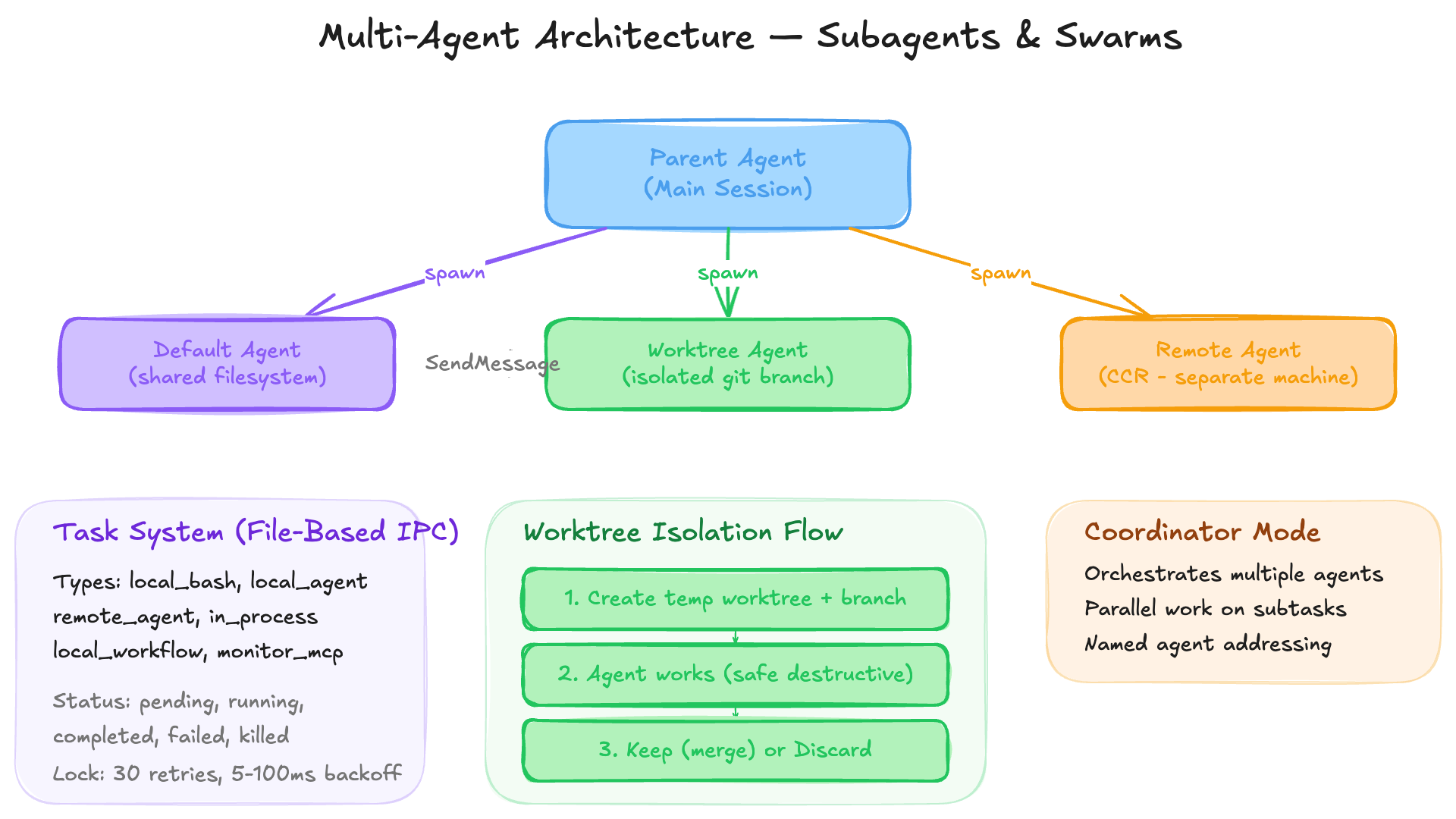
The AgentTool spawns child agents with configurable isolation:
- Default — Shared filesystem, separate conversation context
- Worktree — Isolated git branch copy, changes merged on exit
- Remote (CCR) — Runs on a separate machine
Agents are addressable by name:
Model: "Ask the test-runner agent to run the suite"
  → SendMessage(to: "test-runner", message: "Run the test suite")
13.2 Task System
Background tasks use file-based IPC with concurrent-session locking:
type TaskType = 'local_bash' | 'local_agent' | 'remote_agent'
              | 'in_process_teammate' | 'local_workflow' | 'monitor_mcp' | 'dream'

type TaskStatus = 'pending' | 'running' | 'completed' | 'failed' | 'killed'
Task IDs use base-36 encoding with type prefixes (b=bash, a=agent, r=remote, etc.).
Lock retries use 30 attempts with 5-100ms backoff (~2.6s max wait) for swarm coordination across tmux/iTerm2 panes.
13.3 Worktree Isolation
EnterWorktreeTool / ExitWorktreeTool provide git-level isolation:
- Create a temporary git worktree on a new branch
- Agent works in the worktree (safe to make destructive changes)
- On exit: keep changes (merge) or discard (clean up)
14. Error Recovery: A System That Refuses to Crash
14.1 API Error Recovery
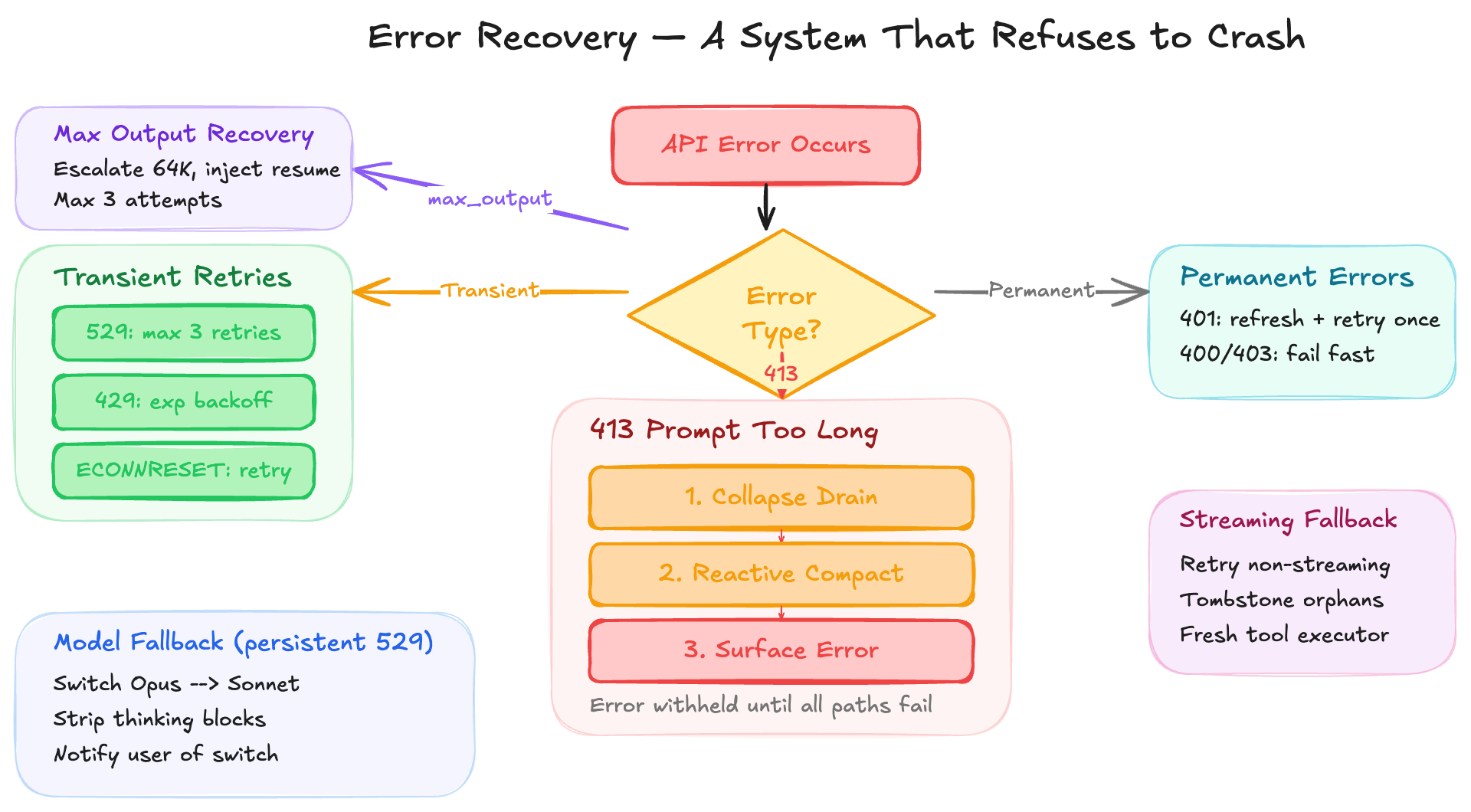
The retry system handles transient and permanent errors differently:
Transient (retryable): | Error | Strategy | |——-|———-| | 529 (Overloaded) | Max 3 retries for foreground queries | | 429 (Rate limit) | Exponential backoff, persistent mode available | | ECONNRESET/EPIPE | Stale connection retry |
Permanent (fail fast): | Error | Strategy | |——-|———-| | 401 | OAuth refresh → retry once → clear credentials | | 400 | Invalid request, no retry | | 403 | Permission denied, no retry |
Persistent retry mode (for unattended operation):
- Env var:
CLAUDE_CODE_UNATTENDED_RETRY - Indefinite 429/529 retries with max 5-minute backoff
- 30-second heartbeat keep-alive messages
14.2 Prompt-Too-Long Recovery
When the API returns 413:
413 Prompt Too Long
  ├─ 1. Collapse drain (commit staged context collapses)
  ├─ 2. Reactive compact (generate full conversation summary)
  └─ 3. Surface error if all paths exhausted
The error is withheld from the SDK until recovery paths are exhausted — the user never sees a 413 if compaction can resolve it.
14.3 Max Output Tokens Recovery
max_output_tokens stop reason
  ├─ 1. Escalate to 64K tokens (once per turn)
  ├─ 2. Inject meta recovery message ("Resume directly")
  ├─ 3. Max 3 attempts before surfacing
  └─ 4. Withhold intermediate errors
14.4 Model Fallback
On persistent 529 errors:
- Switch to fallback model (e.g., Sonnet when Opus is overloaded)
- Strip thinking blocks (model-bound signatures)
- Log fallback event with chain ID
- Yield system message about the switch
14.5 Streaming Fallback
If streaming fails mid-response:
- Retry with non-streaming request
- Tombstone orphaned messages
- Clear assistant messages to restart the turn
- Fresh tool executor to prevent orphan results
15. Cost Tracking and Telemetry
15.1 Usage Accumulation
Per-model tracking:
- Input tokens, output tokens
- Cache read/write tokens
- Web search requests
- USD cost (calculated via
calculateUSDCost())
Advisor model costs are recursively accumulated from getAdvisorUsage().
15.2 Display
formatTotalCost() produces a multi-line report:
- Total cost
- Per-model breakdown
- API/wall-clock duration
- Lines of code changed
- Unknown model cost disclaimer
15.3 Telemetry
Analytics use a decoupled sink pattern:
attachAnalyticsSink()called during startup- Events queued until sink is available (prevents import cycles)
- Datadog fanout + first-party event logging
- PII-tagged fields for compliance
- OpenTelemetry spans for LLM request tracing
Gateway detection identifies proxy infrastructure from response headers: LiteLLM, Helicone, Portkey, Cloudflare AI Gateway, Kong, Braintrust, Databricks.
16. Execution Modes: One Codebase, Many Faces
Claude Code runs in multiple modes from a single codebase:
Interactive CLI (Default)
Full React terminal UI with REPL loop, text selection, mouse support, and rich rendering.
Non-Interactive / Headless
--print mode outputs the response to stdout. --output saves to a file. No user interaction — suitable for scripts, CI/CD, and piping.
MCP Server Mode
claude mcp serve runs Claude Code as an MCP server, exposing its tools to other MCP clients.
Bridge Mode (Claude.ai Integration)
WebSocket connection to claude.ai for remote control:
- CLI sends status updates to the web UI
- Web UI sends control commands back
- Bidirectional message adaptation (SDK format ↔ local format)
- Viewer-only mode for read-only clients
Remote / Teleport
claude remote-control exposes the CLI as a WebSocket server. Users can connect via claude.ai’s web interface or QR code.
Local Agent Mode
Subprocesses spawned for multi-agent swarms. Each agent gets its own session, AppState, and task directory. Communication via file I/O.
Coordinator Mode
Orchestrates multiple agents working in parallel on different aspects of a task. (See dedicated section below.)
17. BUDDY: A Tamagotchi-Style AI Pet
One of the most surprising finds in the codebase: a fully implemented Tamagotchi-style virtual companion that lives beside the user’s input box. What started as an April Fools feature (teaser window: April 1-7, 2026) became a real, permanent feature.
17.1 How Your Buddy Is Born
Every companion is deterministically generated from the user’s account ID using a Mulberry32 seeded PRNG:
// Mulberry32 — tiny seeded PRNG, good enough for picking ducks
function mulberry32(seed: number): () => number {
  let a = seed >>> 0
  return function () {
    a |= 0
    a = (a + 0x6d2b79f5) | 0
    let t = Math.imul(a ^ (a >>> 15), 1 | a)
    t = (t + Math.imul(t ^ (t >>> 7), 61 | t)) ^ t
    return ((t ^ (t >>> 14)) >>> 0) / 4294967296
  }
}
The seed is hash(userId + 'friend-2026-401'). This means your companion is unique to you but identical across devices and sessions — you always get the same one.
17.2 Species, Rarity, and Cosmetics
18 species: duck, goose, blob, cat, dragon, octopus, owl, penguin, turtle, snail, ghost, axolotl, capybara, cactus, robot, rabbit, mushroom, chonk
Species names are encoded as String.fromCharCode(0x64,0x75,0x63,0x6b) rather than string literals to avoid tripping an excluded-strings build check (one species name collides with a model codename).
Rarity tiers (weighted random):
| Tier | Weight | Stat Floor | Hat? |
|---|---|---|---|
| Common | 60% | 5 | None |
| Uncommon | 25% | 15 | Random |
| Rare | 10% | 25 | Random |
| Epic | 4% | 35 | Random |
| Legendary | 1% | 50 | Random |
Cosmetics:
- 6 eye styles:
·,+,x,@,°, and a special star eye - 8 hats: none, crown, tophat, propeller, halo, wizard, beanie, tinyduck
- 1% shiny chance — independent of rarity
- 5 stats: DEBUGGING, PATIENCE, CHAOS, WISDOM, SNARK — one peak stat, one dump stat, rest scattered. Higher rarity = higher stat floors.
Each species star rating displays with themed colors: common (inactive), uncommon (green), rare (permission blue), epic (auto-accept purple), legendary (warning gold).
17.3 Soul Generation
On first “hatch,” Claude generates a unique name and personality for the companion. This is stored permanently in the user’s global config as StoredCompanion:
type StoredCompanion = CompanionSoul & { hatchedAt: number }
type CompanionSoul = { name: string; personality: string }
Critically, only the soul persists — bones (species, rarity, stats) are regenerated from the userId hash every time. This prevents users from editing their config to fake a legendary, and allows species renames without breaking stored companions.
17.4 Sprite Animation System
Each species has 3 animation frames as 5-line, 12-character-wide ASCII art:
Frame 0 (idle):     Frame 1 (fidget):   Frame 2 (rare):
    __                   __               __
  <(· )___             <(· )___         <(· )___
   (  ._>               (  ._>           (  .__>
    `--´                 `--´~            `--´
Eye placeholders {E} are replaced with the companion’s assigned eye character at render time. Hat lines overlay the top row (only when the species’ top row is blank).
The idle sequence cycles at 500ms per tick:
const IDLE_SEQUENCE = [0, 0, 0, 0, 1, 0, 0, 0, -1, 0, 0, 2, 0, 0, 0]
// -1 = "blink on frame 0" (eyes temporarily replaced)
This creates a natural feel: mostly still, occasional fidgets, rare blinks.
17.5 Speech Bubbles and Interaction
The companion renders as a CompanionSprite React component positioned beside the prompt input. It features:
- Speech bubbles with a
SpeechBubblecomponent using rounded borders - Bubbles display for ~10 seconds (20 ticks) then fade over the last 3 seconds
/buddy pettriggers a floating heart animation (2.5 seconds) with hearts drifting upward- The companion can react to conversation events via
companionReactionin AppState - When terminal is too narrow (<100 cols), the full sprite is hidden and replaced with a compact face-only rendering
A companion intro is injected as a special attachment into the conversation, informing Claude that a small creature named X sits beside the input box and occasionally comments in bubbles.
17.6 Teaser and Release Strategy
export function isBuddyTeaserWindow(): boolean {
  const d = new Date()
  return d.getFullYear() === 2026 && d.getMonth() === 3 && d.getDate() <= 7
}
The teaser uses local dates, not UTC — creating a rolling 24-hour wave across timezones for sustained social media buzz rather than a single UTC-midnight spike. During the teaser window, users who haven’t hatched a companion see a rainbow-colored /buddy notification.
18. KAIROS: Persistent Assistant Mode and Auto-Dreaming
KAIROS (feature-flagged as KAIROS) is a complete alternate UX where Claude becomes a long-lived autonomous agent that persists across sessions — the “Always-On Claude.”
18.1 Auto-Dreaming: Memory Consolidation
The most concrete KAIROS subsystem in the codebase is the auto-dream system (services/autoDream/). This is a background memory consolidation agent that runs as a forked subagent.
Gate order (cheapest checks first):
- Time gate: Hours since last consolidation >=
minHours(default: 24h) - Session gate: Number of transcript sessions since last consolidation >=
minSessions(default: 5) - Lock gate: No other process is mid-consolidation (file lock with mtime-based conflict detection)
- Scan throttle: Even when the time gate passes, session scanning is throttled to every 10 minutes
The 4-phase dream prompt:
Phase 1 — Orient
  └─ ls the memory directory, read the index, skim existing topic files

Phase 2 — Gather recent signal
  └─ Check daily logs, find drifted memories, grep transcripts narrowly

Phase 3 — Consolidate
  └─ Write/update memory files, merge duplicates, convert relative dates

Phase 4 — Prune and index
  └─ Update the entrypoint index (max ~25KB), remove stale pointers
Tool constraints for dream runs: Bash is restricted to read-only commands only — ls, find, grep, cat, stat, wc, head, tail. Write operations are denied. File edits go through the normal Edit/Write tools with permission via createAutoMemCanUseTool().
Dream task lifecycle:
type DreamTaskState = {
  type: 'dream'
  phase: 'starting' | 'updating'    // Flips when first Edit/Write lands
  sessionsReviewing: number
  filesTouched: string[]             // Paths observed in Edit/Write tool_use
  turns: DreamTurn[]                 // Last 30 assistant turns (rolling window)
  abortController?: AbortController
  priorMtime: number                 // For lock rollback on failure
}
Users can kill a running dream from the background tasks dialog (Shift+Down). On kill, the lock mtime is rewound so the next session can retry.
18.2 KAIROS Integration Points
KAIROS is referenced throughout the codebase:
getKairosActive()in bootstrap state — gates whether KAIROS mode is active- Auto-dream is disabled in KAIROS mode (KAIROS uses its own disk-skill dream variant)
- Brief mode (
BriefTool) — all output goes throughSendUserMessagetool (structured markdown + attachments + status) - Proactive
<tick>prompts — periodic check-ins where Claude decides what to do next - 15-second blocking budget — commands exceeding 15s are auto-backgrounded
- Exclusive tools:
SendUserFile,PushNotification,SubscribePR(GitHub webhook subscriptions),SleepTool - Append-only daily logs at
~/.claude/projects/<slug>/memory/logs/YYYY/MM/YYYY-MM-DD.md - Midnight boundary handling — flushes yesterday’s transcript on date change so the dream process can find it
18.3 Session History (Assistant Mode)
assistant/sessionHistory.ts provides paginated session event retrieval for KAIROS:
type HistoryPage = {
  events: SDKMessage[]
  firstId: string | null    // Cursor for next-older page
  hasMore: boolean
}
Uses OAuth-authenticated API calls to CCR (Claude Code Remote) to fetch session transcripts. Pagination goes backwards (newest → oldest) with 100 events per page and 15-second timeout per request.
19. ULTRAPLAN: Remote Planning Sessions
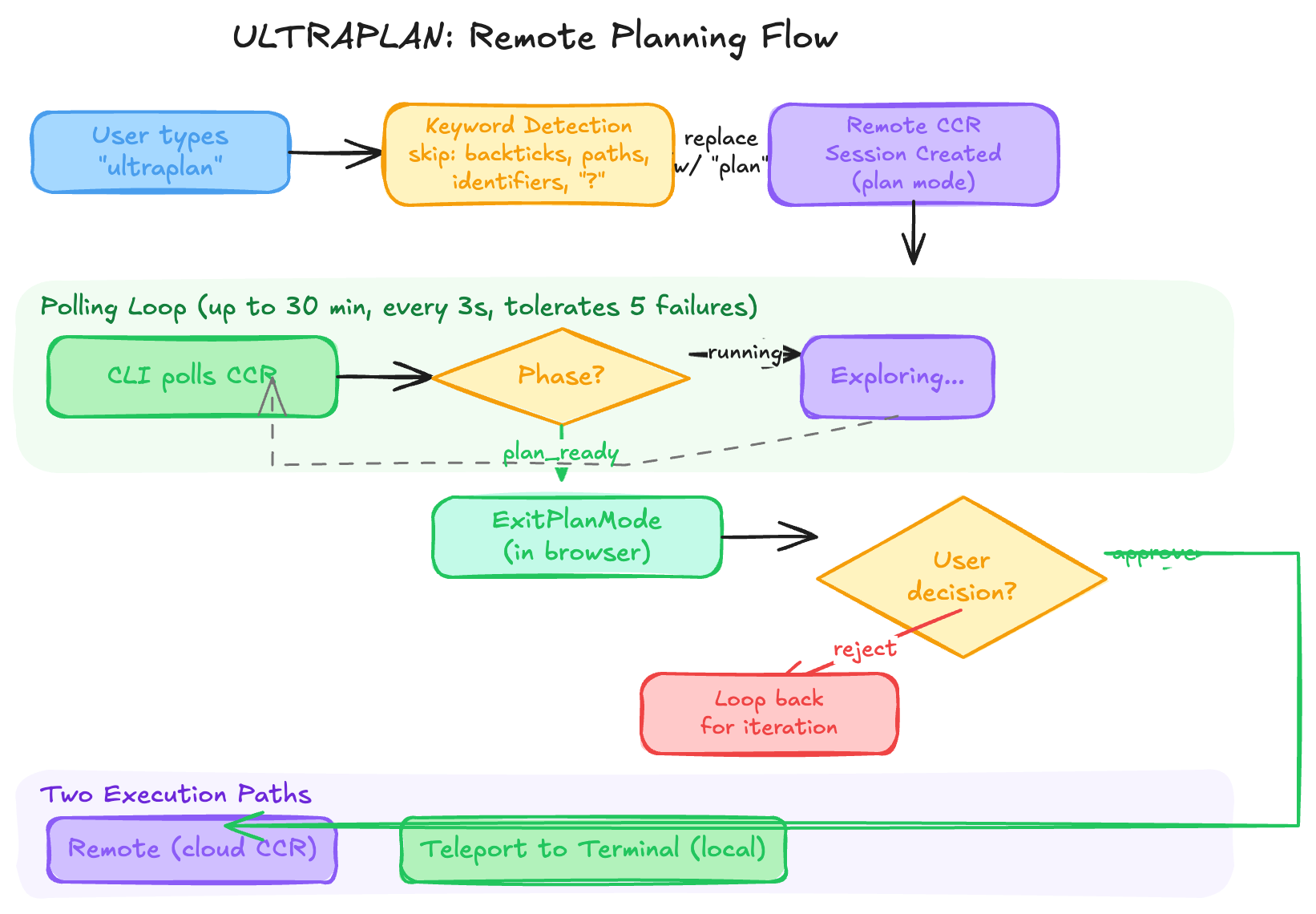
ULTRAPLAN is an interactive planning system that farms out complex exploration to a remote Claude Code instance (CCR) for up to 30 minutes.
19.1 How It Works
- User types “ultraplan” (keyword detection, not slash command) or uses
/ultraplan - A remote CCR session is created with plan mode pre-configured
- The CLI polls the remote session every 3 seconds for up to 30 minutes
- Remote Claude explores, plans, and calls
ExitPlanModewhen ready - User approves or rejects the plan in the browser (claude.ai)
- Rejected plans loop back for iteration
19.2 Keyword Detection
The keyword trigger system (utils/ultraplan/keyword.ts) is remarkably sophisticated. It finds “ultraplan” in user input while avoiding false positives:
Skipped contexts:
- Inside paired delimiters (backticks, quotes, brackets, angle brackets)
- Path-like context (
src/ultraplan/foo.ts,ultraplan.tsx) - Identifier-like context (
--ultraplan-mode,ultraplan-s) - Followed by
?(questions about the feature shouldn’t invoke it) - Slash command input (
/rename ultraplan fooruns/rename, not ultraplan)
When triggered, “ultraplan” is replaced with “plan” in the forwarded prompt to keep it grammatical: "please ultraplan this" → "please plan this".
19.3 Two Execution Paths on Approval
On approval, the user chooses one of two paths:
| Path | What Happens |
|---|---|
| “remote” | Execute the plan in the cloud CCR instance |
| “teleport to terminal” | Archive the remote session, execute locally |
The teleport path uses a sentinel string __ULTRAPLAN_TELEPORT_LOCAL__ embedded in the browser’s rejection feedback. The rejection keeps the remote in plan mode, but the plan text is extracted from the feedback and executed locally.
19.4 Event Stream Scanning
The ExitPlanModeScanner class is a pure stateful classifier for the CCR event stream:
type ScanResult =
  | { kind: 'approved'; plan: string }
  | { kind: 'teleport'; plan: string }
  | { kind: 'rejected'; id: string }
  | { kind: 'pending' }
  | { kind: 'terminated'; subtype: string }
  | { kind: 'unchanged' }
Phase tracking for the UI pill:
running → (turn ends, no ExitPlanMode) → needs_input
needs_input → (user replies in browser) → running
running → (ExitPlanMode emitted) → plan_ready
plan_ready → (rejected) → running
plan_ready → (approved) → poll resolves, pill removed
Resilience: The poller tolerates up to 5 consecutive network failures before aborting (a 30-minute poll makes ~600 API calls — at any nonzero failure rate, one blip is inevitable).
20. Coordinator Mode: Multi-Agent Orchestrator
Coordinator Mode (CLAUDE_CODE_COORDINATOR_MODE=1) transforms Claude Code from a single-agent assistant into a multi-agent orchestrator where a master coordinator directs multiple parallel workers.
20.1 Architecture
Coordinator (you)
  ├─ AgentTool → Worker A (research)     ─┐
  ├─ AgentTool → Worker B (research)     ─┤ Run in parallel
  ├─ AgentTool → Worker C (implement)    ─┘
  └─ SendMessage → Continue Worker A with synthesized spec
The coordinator’s system prompt enforces a strict discipline:
- “Never write ‘based on your findings’“ — the coordinator must synthesize worker research into specific specs with file paths, line numbers, and exactly what to change
- Workers report back as XML
<task-notification>messages with status, summary, result, and usage - The coordinator never polls — workers push completion notifications
- Workers get isolated scratch directories (via
tengu_scratchfeature gate) for durable cross-worker knowledge
20.2 Worker Capabilities
Workers spawned via AgentTool have access to standard tools (or a simplified Bash/Read/Edit set in CLAUDE_CODE_SIMPLE mode), plus MCP tools from configured servers. The coordinator injects a workerToolsContext into the system prompt listing exactly which tools workers can use.
20.3 Task Workflow
The coordinator system prompt defines four phases:
| Phase | Who | Purpose |
|---|---|---|
| Research | Workers (parallel) | Investigate codebase, find files |
| Synthesis | Coordinator | Read findings, craft implementation specs |
| Implementation | Workers | Make changes per spec, commit |
| Verification | Workers | Prove the code works (not just confirm it exists) |
Concurrency rules:
- Read-only tasks (research) — run in parallel freely
- Write-heavy tasks (implementation) — one at a time per set of files
- Verification — can run alongside implementation on different file areas
20.4 Continue vs. Spawn
The system provides explicit guidance on when to continue an existing worker vs. spawn fresh:
| Situation | Mechanism | Reason |
|---|---|---|
| Research explored the exact files to edit | Continue | Worker already has files in context |
| Research was broad, implementation is narrow | Spawn fresh | Avoid exploration noise |
| Correcting a failure | Continue | Worker has error context |
| Verifying another worker’s code | Spawn fresh | Verifier needs fresh eyes |
| Wrong approach entirely | Spawn fresh | Wrong context pollutes retry |
20.5 Session Mode Matching
When resuming a session, coordinator mode is automatically matched to the stored session mode:
export function matchSessionMode(sessionMode: 'coordinator' | 'normal' | undefined): string | undefined {
  // If current mode doesn't match the resumed session, flip the env var
  if (sessionIsCoordinator) {
    process.env.CLAUDE_CODE_COORDINATOR_MODE = '1'
  } else {
    delete process.env.CLAUDE_CODE_COORDINATOR_MODE
  }
}
This prevents a normal session from being resumed in coordinator mode (or vice versa), which would cause confusion.
21. The Memory System: Persistent AI Memory
Claude Code has a sophisticated file-based memory system (memdir/) that allows it to remember context across conversations — user preferences, project knowledge, feedback, and reference pointers.
21.1 Memory Architecture
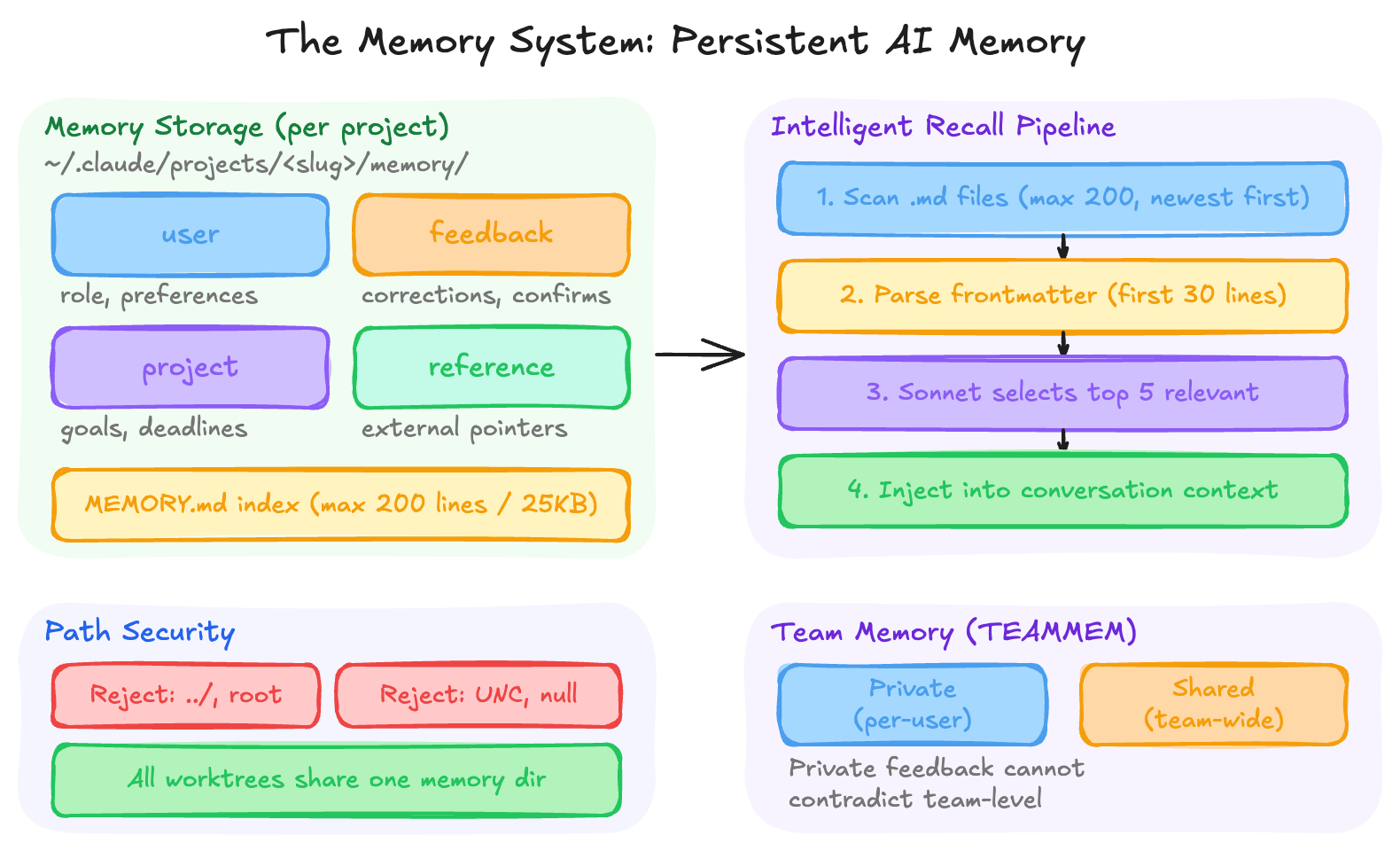
Memories are stored as individual markdown files with YAML frontmatter at ~/.claude/projects/<sanitized-project-root>/memory/:
---
name: user_role
description: User is a senior backend engineer focused on Rust
type: user
---

User is a senior backend engineer at Acme Corp, primarily works in Rust...
An index file MEMORY.md (max 200 lines / 25KB) serves as a table of contents — it’s loaded into every conversation’s system prompt so Claude knows what memories exist without reading them all.
21.2 Four Memory Types
| Type | Purpose | Example |
|---|---|---|
user |
Role, preferences, knowledge level | “User is a data scientist, new to React” |
feedback |
How to approach work (corrections + confirmations) | “Don’t mock the database in integration tests” |
project |
Ongoing work, goals, deadlines | “Merge freeze begins 2026-03-05 for mobile release” |
reference |
Pointers to external systems | “Pipeline bugs tracked in Linear project INGEST” |
The system explicitly does NOT save: code patterns, architecture, git history, debugging solutions, or anything derivable from the current project state.
21.3 Intelligent Memory Recall
Not all memories are loaded every turn. Instead, a Sonnet-powered relevance selector (findRelevantMemories.ts) runs as a side query:
- Scan all
.mdfiles in the memory directory (max 200, newest-first) - Parse frontmatter headers (name, description, type) from the first 30 lines
- Send the user’s query + memory manifest to Sonnet with structured JSON output
- Sonnet returns up to 5 most relevant filenames
- Those files are injected into the conversation context
A clever optimization: recently-used tools are passed to the selector so it skips reference docs for tools Claude is already exercising (e.g., don’t surface MCP spawn docs when Claude is actively using the spawn tool).
21.4 Path Security
The memory path system includes robust security validation:
- Rejects relative paths, root paths, UNC paths, null bytes
projectSettings(committed to repo) is intentionally excluded fromautoMemoryDirectory— a malicious repo could otherwise setautoMemoryDirectory: "~/.ssh"and gain write access to sensitive directories- All worktrees of the same git repo share one memory directory (via
findCanonicalGitRoot) CLAUDE_COWORK_MEMORY_PATH_OVERRIDEfor SDK/Cowork integration
21.5 Team Memory
When the TEAMMEM feature is enabled, memories split into private (per-user) and team (shared) directories. User preferences stay private; project conventions and reference pointers default to team scope. A conflict rule prevents private feedback memories from contradicting team-level ones.
22. Hooks: User-Defined Automation
The hooks system (schemas/hooks.ts) lets users attach automated behaviors to Claude Code events — shell commands, LLM prompts, HTTP calls, or agent verifiers that fire before/after tool use, message submission, and more.
22.1 Four Hook Types
type HookCommand =
  | { type: 'command'; command: string; shell?: 'bash' | 'powershell' }
  | { type: 'prompt'; prompt: string; model?: string }
  | { type: 'http'; url: string; headers?: Record<string, string> }
  | { type: 'agent'; prompt: string; model?: string }
Command hooks run shell commands with optional timeout, async/background execution, and one-shot mode (once: true — runs once then auto-removes).
Prompt hooks evaluate an LLM prompt with $ARGUMENTS placeholder for the hook input JSON.
HTTP hooks POST the hook input to a URL with configurable headers and env var interpolation (only explicitly-allowed env vars are resolved — prevents leaking secrets).
Agent hooks run a full agentic verification loop (“Verify that unit tests ran and passed”) with configurable model and timeout.
22.2 Event-Matcher-Hook Pipeline
Hooks are configured in settings.json as a three-level structure:
Event → Matcher[] → Hook[]
Each event (PreToolUse, PostToolUse, PreMessage, PostMessage, etc.) has an array of matchers with optional permission-rule-syntax patterns (e.g., "Bash(git *)" — only fires for git commands). Each matcher has an array of hooks to execute.
The if condition field uses the same permission rule syntax as the tool permission system, evaluated against tool_name and tool_input — so hooks can fire selectively without spawning a process for every tool call.
22.3 Advanced Hook Features
async: true— Hook runs in background without blocking the modelasyncRewake: true— Runs in background but wakes the model on exit code 2 (blocking error)once: true— Auto-removes after first execution (useful for one-time setup)statusMessage— Custom spinner text while the hook runs- Environment variable interpolation in HTTP headers with explicit allowlist
23. Voice Mode, Bridge, and Infrastructure
23.1 Voice Mode
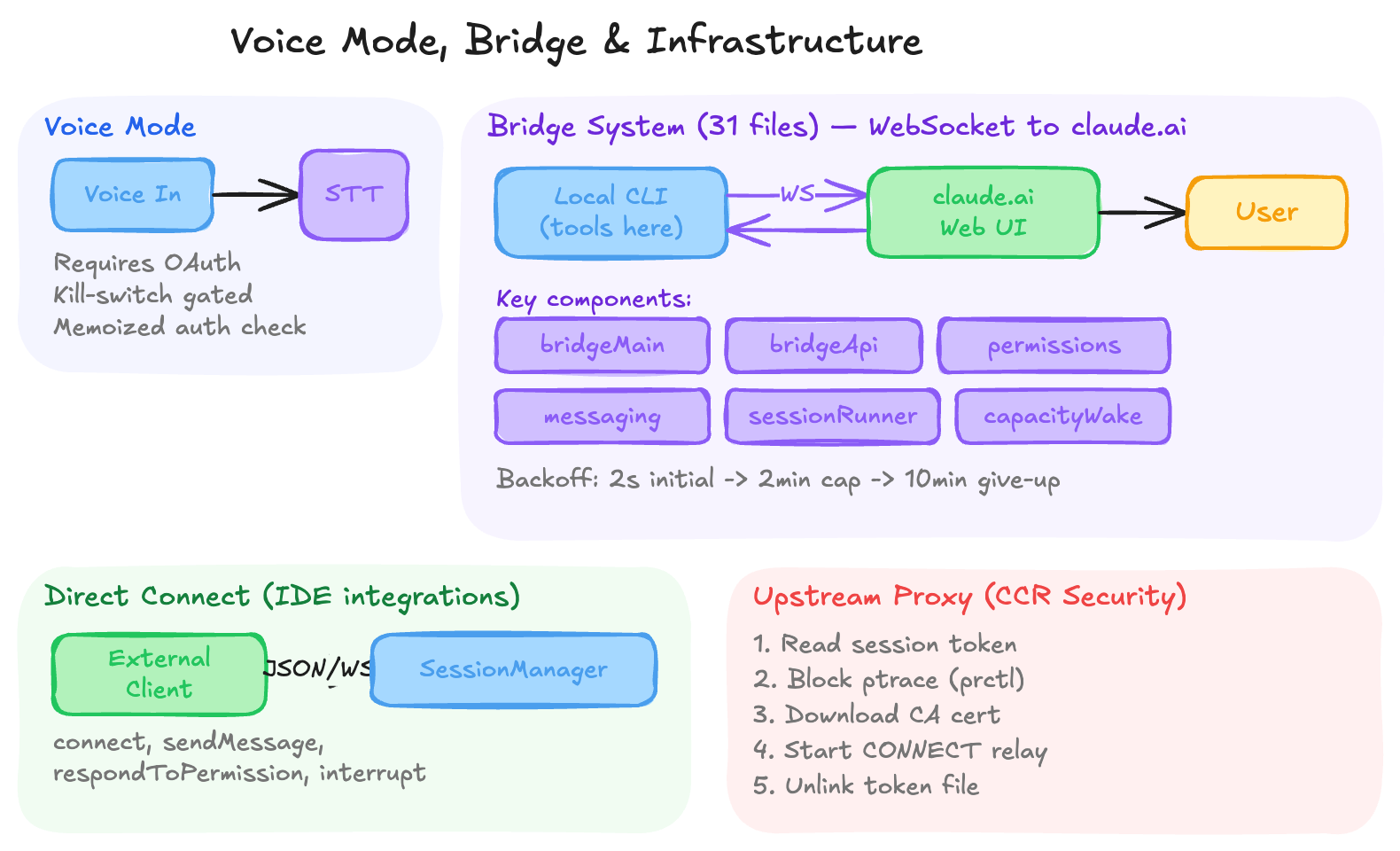
Claude Code includes a voice input mode (feature-flagged as VOICE_MODE) that allows voice-to-text interaction:
- Requires Anthropic OAuth (not API keys, Bedrock, or Vertex) — uses the
voice_streamendpoint on claude.ai - Protected by a GrowthBook kill-switch (
tengu_amber_quartz_disabled) for emergency off - Auth check uses memoized keychain reads (~20-50ms first call, cache hit thereafter)
- The
/voicecommand, ConfigTool, and aVoiceModeNoticecomponent all gate onisVoiceModeEnabled()
23.2 The Bridge System (31 Files)
The bridge (bridge/) is the most substantial networking subsystem — a persistent WebSocket connection between the local CLI and claude.ai’s web interface (CCR). It enables using Claude Code from a browser while the actual tools execute locally.
Key components:
bridgeMain.ts— Main bridge loop with exponential backoff (2s initial → 2min cap → 10min give-up)replBridge.ts/replBridgeTransport.ts— REPL-side bridge handle, message framingbridgeApi.ts— API client with JWT refresh, trusted device tokens, session validationbridgeMessaging.ts/inboundMessages.ts— Message adaptation (SDK format ↔ local format)bridgePermissionCallbacks.ts— Permission request mediation between web UI and local CLIsessionRunner.ts— Spawns agent sessions per work item, manages worktreescapacityWake.ts— Wakes idle bridge when capacity becomes availableworkSecret.ts— Encrypted work routing between bridge workers
The bridge handles session lifecycle, token refresh, trusted device enrollment, and graceful reconnection — essentially a mini-RPC framework over WebSocket.
23.3 Direct Connect
The server/ directory implements Direct Connect — a WebSocket-based protocol for external clients to connect to a running Claude Code instance:
class DirectConnectSessionManager {
  connect(): void                    // Open WebSocket
  sendMessage(content): boolean      // Send user message
  respondToPermissionRequest(...)    // Handle tool permission prompts
  sendInterrupt(): void              // Cancel current request
  disconnect(): void                 // Close connection
}
Messages are JSON-over-WebSocket using the SDK message format. Control requests (permission prompts) are forwarded to the client, which responds with allow/deny decisions. This enables IDE integrations and custom frontends.
23.4 Upstream Proxy (CCR Security)
When running inside a CCR container, the upstream proxy system (upstreamproxy/) provides secure network access:
- Read session token from
/run/ccr/session_token - Set
prctl(PR_SET_DUMPABLE, 0)— blocks same-UID ptrace (prevents prompt-injectedgdb -p $PPIDfrom scraping the token off the heap) - Download CA certificate and concatenate with system bundle for MITM proxy trust
- Start local CONNECT→WebSocket relay on a random port
- Unlink the token file (token stays heap-only; file is gone before the agent loop can access it)
- Inject
HTTPS_PROXY/SSL_CERT_FILEenv vars for all subprocesses
Every step fails open — a broken proxy never breaks an otherwise-working session. The NO_PROXY list covers loopback, RFC1918, IMDS, Anthropic API, GitHub, and package registries.
23.5 Output Styles
The outputStyles/ system lets users customize Claude’s response format via markdown files:
- Project styles:
.claude/output-styles/*.md - User styles:
~/.claude/output-styles/*.md - Plugin styles: provided by installed plugins
Each style file has frontmatter (name, description, keep-coding-instructions) and a prompt body that shapes how Claude formats its responses.
23.6 Native TypeScript Modules
native-ts/ contains TypeScript bindings for performance-critical native code:
yoga-layout/— TypeScript interface to the Yoga layout engine (flexbox calculations)file-index/— Native file indexing for fast codebase searchcolor-diff/— Native color difference calculations (for theme/styling)
23.7 Moreright (Internal-Only)
The moreright/ directory contains a stub for an internal-only feature. The external build ships a no-op implementation with onBeforeQuery, onTurnComplete, and render all returning trivially. The real implementation is internal to Anthropic.
24. Vim Mode, Keybindings, and Developer Ergonomics
24.1 Vim Mode
A full vi command system:
- Motions — h, j, k, l, w, b, e, 0, $, gg, G
- Operators — d (delete), c (change), y (yank)
- Text Objects — iw (inner word), ap (a paragraph)
- Modal State Machine — Insert, Normal, Visual modes
All compiled to a single-pass command matcher for low-latency input processing.
24.2 Dynamic Keybindings
Context-aware keybinding resolution:
type KeybindingContext = {
  focus?: 'prompt' | 'file' | 'terminal'
  isRecording?: boolean
  vimMode?: boolean
  mode?: 'insert' | 'normal' | 'visual'
}
Users can define chord bindings: ctrl+k ctrl+o maps to custom actions via ~/.claude/keybindings.json.
24.3 Debug Tools
CLAUDE_CODE_DEBUG_REPAINTS=1— Shows component owner chain for every repaintCLAUDE_CODE_COMMIT_LOG=/tmp/commits.log— Logs slow renders for profilingCLAUDE_CODE_PROFILE_STARTUP=1— Full startup profiling with memory snapshots
25. Key Engineering Patterns and Takeaways
Pattern 1: Lazy Everything
Claude Code is aggressive about deferral:
- Lazy schemas — Zod instantiation deferred via
lazySchema() - Lazy commands — Module imports via
load()functions - Lazy tools — 18 tools deferred to
ToolSearchTool - Lazy modules — Dynamic imports for OpenTelemetry, analytics, heavy components
- Lazy bundled skills — Reference files extracted on first use
Pattern 2: Memoization by Identity
Key functions are memoized to prevent redundant work:
COMMANDS()— Memoized, cleared byclearCommandMemoizationCaches()loadAllCommands(cwd)— Memoized by working directoryinit()— Memoized to prevent re-entrancy
Pattern 3: Feature Flags for Dead Code Elimination
Bun’s feature() function enables compile-time dead code elimination:
if (feature('COORDINATOR_MODE')) {
  // This entire block is removed from the binary when the flag is off
  const { CoordinatorUI } = await import('./coordinator/index.js')
}
Pattern 4: Interning for Performance
Three interning pools (chars, styles, hyperlinks) reduce memory and enable O(1) comparison by integer ID instead of string equality. The style pool even pre-computes ANSI transition sequences.
Pattern 5: Fail-Closed Security
The buildTool() factory provides safe defaults for 7 commonly-stubbed methods. Permissions default to “ask” — a tool must explicitly opt into auto-approval.
Pattern 6: Centralized Side Effects
onChangeAppState() is the single choke point for all state mutations that affect external systems. No scattered useEffect side effects.
Pattern 7: File-Based IPC
Multi-agent coordination uses files, not sockets:
- Task outputs in
~/.claude/ - History in
~/.claude/history.jsonl - Session transcripts for resume
- Lock files with retry backoff for concurrent access
Pattern 8: Prompt Cache Stability
Tools are sorted alphabetically before being sent to the API. This keeps the tool list in the same order across requests, maximizing prompt cache hit rates.
Pattern 9: Progressive Disclosure
The deferred tool system implements progressive disclosure at the API level:
- Base prompt stays under 200K tokens
- Model discovers additional tools on demand via
ToolSearchTool - Discovered tools are callable in the same turn
Pattern 10: Three-Tier Configuration
Settings are resolved from multiple sources with clear precedence:
MDM Policy (highest) → Remote Managed → User Settings
→ Project Config → Global Config → Defaults (lowest)
26. Conclusion
Claude Code is a remarkable piece of engineering. What appears to the user as a simple chat interface in the terminal is backed by:
- A custom React reconciler with Yoga layout, double-buffered rendering, and hardware scroll optimization
- A resilient query engine with automatic context compression, multi-strategy error recovery, and token budget continuation
- A 60+ tool ecosystem unified under a single generic interface with Zod validation, lazy schemas, and elastic discovery
- A multi-layered permission system balancing security and developer productivity across 5 modes, rule patterns, and ML classifiers
- An extensibility framework spanning skills, plugins, and MCP with 8 configuration scopes and 5 transport types
- Production-grade infrastructure: interned style pools, file-based IPC, sampled profiling, parallelized startup, and comprehensive telemetry
The codebase demonstrates that a CLI tool can be as architecturally sophisticated as any web application — perhaps more so, given the unique constraints of terminal rendering, keyboard input ambiguity, and the need to coordinate an AI model, file system, shell, and git repository all within a single conversation loop.
For developers building similar tools, the key lessons are:
- Invest in the rendering layer. Claude Code’s custom Ink framework is its competitive advantage for terminal UX.
- Design for failure. The multi-strategy error recovery (compaction → collapse → fallback → surface) means users almost never see raw API errors.
- Defer aggressively. Lazy loading at every level — schemas, modules, tools, skills — keeps startup fast and memory bounded.
- Intern everything. Style pools, character pools, and hyperlink pools turn O(n) string comparisons into O(1) integer comparisons.
- Make safety the default. Fail-closed permissions, dangerous pattern detection, and mandatory confirmation for destructive operations build user trust.
Claude Code isn’t just a wrapper around an API. It’s a complete development environment that happens to run in your terminal.
This analysis is based on examination of the Claude Code source code. All technical details reflect the codebase as observed at the time of analysis.